3D карусель для изображений - пример html js css


Книга 3D карусель для изображений


3D карусель для изображений (HTML код)


<div id="drag-container">
<div id="spin-container">
<!-- Add your images (or video) here -->
<img src="https://images.pexels.com/photos/206395/pexels-photo-206395.jpeg?auto=compress&cs=tinysrgb&dpr=1&w=500" alt="">
<img src="https://images.pexels.com/photos/1391498/pexels-photo-1391498.jpeg?auto=compress&cs=tinysrgb&dpr=1&w=500" alt="">
<img src="https://images.pexels.com/photos/1382731/pexels-photo-1382731.jpeg?auto=compress&cs=tinysrgb&dpr=1&w=500" alt="">
<img src="https://images.pexels.com/photos/1758144/pexels-photo-1758144.jpeg?auto=compress&cs=tinysrgb&dpr=1&w=500" alt="">
<img src="https://images.pexels.com/photos/1382734/pexels-photo-1382734.jpeg?auto=compress&cs=tinysrgb&dpr=1&w=500" alt="">
<img src="https://images.pexels.com/photos/1462636/pexels-photo-1462636.jpeg?auto=compress&cs=tinysrgb&dpr=1&w=500" alt="">

<!-- Example image with link -->
<a target="_blank" href="https://images.pexels.com/photos/139829/pexels-photo-139829.jpeg">
<img src="https://images.pexels.com/photos/139829/pexels-photo-139829.jpeg?auto=compress&cs=tinysrgb&dpr=1&w=500" alt="">
</a>

<!-- Example add video -->
<video controls autoplay="autoplay" loop>
<source src="https://player.vimeo.com/external/322244668.sd.mp4?s=338c48ac2dfcb1d4c0689968b5baf94eee6ca0c1&profile_id=165&oauth2_token_id=57447761" type="video/mp4">
</video>

<!-- Text at center of ground -->
<p>3D Tiktok Carousel</p>
</div>
<div id="ground"></div>
</div>

<div id="music-container"></div>


<!-- github corner (https://github.com/tholman/github-corners) -->
<a href="https://github.com/HoangTran0410/3DCarousel" target="_blank" class="github-corner" aria-label="View source on GitHub"><svg width="80" height="80" viewBox="0 0 250 250" style="fill:#fff; color:#000; position: absolute; top: 0; border: 0; right: 0;" aria-hidden="true"><path d="M0,0 L115,115 L130,115 L142,142 L250,250 L250,0 Z"></path><path d="M128.3,109.0 C113.8,99.7 119.0,89.6 119.0,89.6 C122.0,82.7 120.5,78.6 120.5,78.6 C119.2,72.0 123.4,76.3 123.4,76.3 C127.3,80.9 125.5,87.3 125.5,87.3 C122.9,97.6 130.6,101.9 134.4,103.2" fill="currentColor" style="transform-origin: 130px 106px;" class="octo-arm"></path><path d="M115.0,115.0 C114.9,115.1 118.7,116.5 119.8,115.4 L133.7,101.6 C136.9,99.2 139.9,98.4 142.2,98.6 C133.8,88.0 127.5,74.4 143.8,58.0 C148.5,53.4 154.0,51.2 159.7,51.0 C160.3,49.4 163.2,43.6 171.4,40.1 C171.4,40.1 176.1,42.5 178.8,56.2 C183.1,58.6 187.2,61.8 190.9,65.4 C194.5,69.0 197.7,73.2 200.1,77.6 C213.8,80.2 216.3,84.9 216.3,84.9 C212.7,93.1 206.9,96.0 205.4,96.6 C205.1,102.4 203.0,107.8 198.3,112.5 C181.9,128.9 168.3,122.5 157.7,114.1 C157.9,116.9 156.7,120.9 152.7,124.9 L141.0,136.5 C139.8,137.7 141.6,141.9 141.8,141.8 Z" fill="currentColor" class="octo-body"></path></svg></a><style>.github-corner:hover .octo-arm{animation:octocat-wave 560ms ease-in-out}@keyframes octocat-wave{0%,100%{transform:rotate(0)}20%,60%{transform:rotate(-25deg)}40%,80%{transform:rotate(10deg)}}@media (max-width:500px){.github-corner:hover .octo-arm{animation:none}.github-corner .octo-arm{animation:octocat-wave 560ms ease-in-out}}</style>


3D карусель для изображений (CSS код)


* {
margin: 0;
padding: 0;
}

html,
body {
height: 100%;
/* for touch screen */
touch-action: none;
}

body {
overflow: hidden;
display: -webkit-box;
display: -ms-flexbox;
display: flex;
background: #111;
-webkit-perspective: 1000px;
perspective: 1000px;
-webkit-transform-style: preserve-3d;
transform-style: preserve-3d;
}

#drag-container, #spin-container {
position: relative;
display: -webkit-box;
display: -ms-flexbox;
display: flex;
margin: auto;
-webkit-transform-style: preserve-3d;
transform-style: preserve-3d;
-webkit-transform: rotateX(-10deg);
transform: rotateX(-10deg);
}

#drag-container img, #drag-container video {
-webkit-transform-style: preserve-3d;
transform-style: preserve-3d;
position: absolute;
left: 0;
top: 0;
width: 100%;
height: 100%;
line-height: 200px;
font-size: 50px;
text-align: center;
-webkit-box-shadow: 0 0 8px #fff;
box-shadow: 0 0 8px #fff;
-webkit-box-reflect: below 10px linear-gradient(transparent, transparent, #0005);
}

#drag-container img:hover, #drag-container video:hover {
-webkit-box-shadow: 0 0 15px #fffd;
box-shadow: 0 0 15px #fffd;
-webkit-box-reflect: below 10px linear-gradient(transparent, transparent, #0007);
}

#drag-container p {
font-family: Serif;
position: absolute;
top: 100%;
left: 50%;
-webkit-transform: translate(-50%,-50%) rotateX(90deg);
transform: translate(-50%,-50%) rotateX(90deg);
color: #fff;
}

#ground {
width: 900px;
height: 900px;
position: absolute;
top: 100%;
left: 50%;
-webkit-transform: translate(-50%,-50%) rotateX(90deg);
transform: translate(-50%,-50%) rotateX(90deg);
background: -webkit-radial-gradient(center center, farthest-side , #9993, transparent);
}

#music-container {
position: absolute;
top: 0;
left: 0;
}

@-webkit-keyframes spin {
from{
-webkit-transform: rotateY(0deg);
transform: rotateY(0deg);
} to{
-webkit-transform: rotateY(360deg);
transform: rotateY(360deg);
}
}

@keyframes spin {
from{
-webkit-transform: rotateY(0deg);
transform: rotateY(0deg);
} to{
-webkit-transform: rotateY(360deg);
transform: rotateY(360deg);
}
}
@-webkit-keyframes spinRevert {
from{
-webkit-transform: rotateY(360deg);
transform: rotateY(360deg);
} to{
-webkit-transform: rotateY(0deg);
transform: rotateY(0deg);
}
}
@keyframes spinRevert {
from{
-webkit-transform: rotateY(360deg);
transform: rotateY(360deg);
} to{
-webkit-transform: rotateY(0deg);
transform: rotateY(0deg);
}
}


3D карусель для изображений (JS код)


// Author: Hoang Tran (https://www.facebook.com/profile.php?id=100004848287494)
// Github verson (1 file .html): https://github.com/HoangTran0410/3DCarousel/blob/master/index.html


// You can change global variables here:
var radius = 240; // how big of the radius
var autoRotate = true; // auto rotate or not
var rotateSpeed = -60; // unit: seconds/360 degrees
var imgWidth = 120; // width of images (unit: px)
var imgHeight = 170; // height of images (unit: px)

// Link of background music - set 'null' if you dont want to play background music
var bgMusicURL = 'https://api.soundcloud.com/tracks/143041228/stream?client_id=587aa2d384f7333a886010d5f52f302a';
var bgMusicControls = true; // Show UI music control

/*
NOTE:
+ imgWidth, imgHeight will work for video
+ if imgWidth, imgHeight too small, play/pause button in

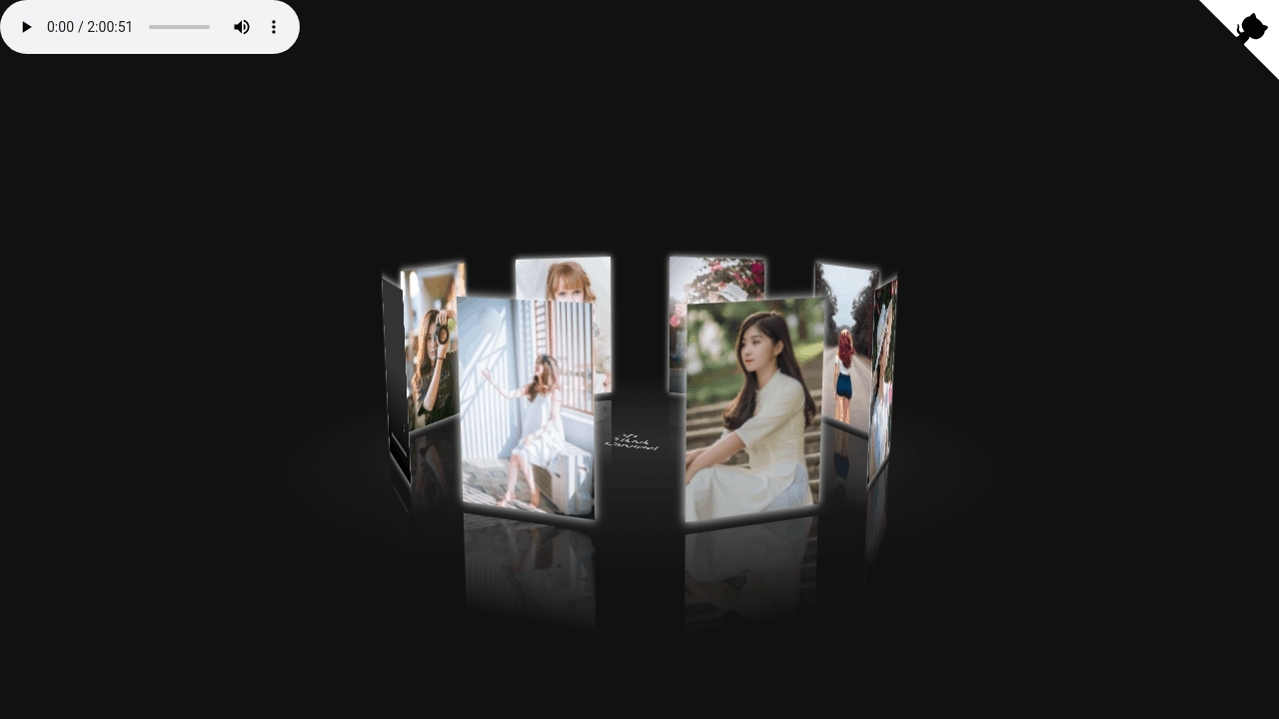
3D карусель для изображений (Результат кода)

830   0  

Comments

    Ничего не найдено.