JS + CSS Калькулятор (HTML код)
<div class="calculator">

	<div class="calculator__top">

		<h1>Calcul</h1>

		<input type="text" class="calculator__top--display" value="" disabled/>

	</div>

	<div class="calculator__middle">

		<div class="calculator__middle--top"></div>

		<div class="calculator__middle--junction"></div>

		<div class="calculator__middle--bottom"></div>

	</div>

	<div class="calculator__bottom">

		<button type="button" class="calculator__bottom--item"><div class="cursor"></div></button>

		<button type="button" class="calculator__bottom--item"><div class="cursor"></div></button>

		<button type="button" class="calculator__bottom--item item-grey-small" data-action="punchline" value="this">THIS</button>

		<button type="button" class="calculator__bottom--item item-grey-small" data-action="punchline" value="is">IS</button>

		<button type="button" class="calculator__bottom--item item-grey-small" data-action="punchline" value="like">LIKE</button>

		<button type="button" class="calculator__bottom--item item-grey-big" data-action="arrow" value=";-)">→</button>

		<button type="button" class="calculator__bottom--item item-grey-small" data-action="punchline" value="an">AN</button>

		<button type="button" class="calculator__bottom--item item-grey-small" data-action="punchline" value="old">OLD</button>

		<button type="button" class="calculator__bottom--item item-grey-small" data-action="punchline" value="calc">CALC</button>

		<button type="button" class="calculator__bottom--item item-grey-small" data-action="punchline" value="ula">ULA</button>

		<button type="button" class="calculator__bottom--item item-grey-small" data-action="punchline" value="tor">TOR</button>

		<button type="button" class="calculator__bottom--item item-grey-big" data-action="squareRoot" value="">√</button>

		<button type="button" class="calculator__bottom--item item-black" value="7">7</button>

		<button type="button" class="calculator__bottom--item item-black" value="8">8</button>

		<button type="button" class="calculator__bottom--item item-black" value="9">9</button>

		<button type="button" class="calculator__bottom--item item-blue" data-action="smile" value="b">B</button>

		<button type="button" class="calculator__bottom--item item-blue" data-action="smile" value="f">F</button>

		<button type="button" class="calculator__bottom--item item-grey-big" data-action="smile" value="?">?</button>

		<button type="button" class="calculator__bottom--item item-black" value="4">4</button>

		<button type="button" class="calculator__bottom--item item-black" value="5">5</button>

		<button type="button" class="calculator__bottom--item item-black" value="6">6</button>

		<button type="button" class="calculator__bottom--item item-grey-big" data-action="operator" value="*">×</button>

		<button type="button" class="calculator__bottom--item item-grey-big" data-action="operator" value="/">/</button>

		<button type="button" class="calculator__bottom--item item-grey-big" data-action="color" value="color">☀︎</button>

		<button type="button" class="calculator__bottom--item item-black" value="1">1</button>

		<button type="button" class="calculator__bottom--item item-black" value="2">2</button>

		<button type="button" class="calculator__bottom--item item-black" value="3">3</button>

		<button type="button" class="calculator__bottom--item item-grey-big" data-action="operator" value="+">+</button>

		<button type="button" class="calculator__bottom--item item-grey-big" data-action="operator" value="-">-</button>

		<button type="button" class="calculator__bottom--item item-red" data-action="clear" value="0">AC</button>

		<button type="button" class="calculator__bottom--item item-black" value="0">0</button>

		<button type="button" class="calculator__bottom--item item-black" value="0">00</button>

		<button type="button" class="calculator__bottom--item item-black" data-action="decimal" value=".">.</button>

		<button type="button" class="calculator__bottom--item item-grey-big" data-action="operator" value="=">=</button>

	</div>

</div>
JS + CSS Калькулятор (CSS код)
@import url("https://fonts.googleapis.com/css2?family=Lato&family=Plaster&display=swap");

@font-face {

  font-family: "Digital dream Regular";

  font-style: normal;

  font-weight: normal;

  src: url("https://assets.codepen.io/4439736/digital-dream.regular.woff") format("woff");

}

*::after,

*::before,

* {

  margin: 0;

  padding: 0;

  box-sizing: inherit;

}


html {

  font-size: 62.5%;

}


body {

  box-sizing: border-box;

  background-color: #E0E0E0;

  font-family: "Lato", sans-serif;

}


.calculator {

  width: 40rem;

  height: 60rem;

  margin: 5rem auto;

}

.calculator__top {

  width: 40rem;

  height: 20rem;

  padding: 1.2rem;

  background-color: rgba(0, 0, 0, 0.9);

  border-top-right-radius: 2.5rem;

  border-top-left-radius: 2.5rem;

  display: flex;

  flex-direction: column;

  justify-content: space-evenly;

  position: relative;

}

.calculator__top h1 {

  color: rgba(255, 255, 255, 0.9);

  font-family: "Plaster", cursive;

}

.calculator__top--display {

  width: 100%;

  height: 12rem;

  border: 1.5rem solid #494D56;

  background-color: rgba(255, 255, 255, 0.7);

  border-radius: 1rem;

  font-size: 1.6rem;

  text-align: right;

  color: black;

  padding: 0.5rem;

  font-family: "Digital dream Regular";

}

.calculator__top--display.on {

  background-color: #48A1BE;

}

.calculator__top:after {

  content: linear-gradient(105deg, rgba(224, 224, 224, 0.3) 31%, transparent 33%);

  position: absolute;

  width: 100%;

  height: 100%;

  top: 0;

  left: 0;

}

.calculator__middle {

  width: 100%;

  height: 3rem;

  background-color: #5f626e;

  position: relative;

}

.calculator__middle--top {

  border: 1px solid black;

  border-bottom: none;

  width: 100%;

  height: 1.5rem;

  box-shadow: 0px 1px 1px rgba(0, 0, 0, 0.5);

}

.calculator__middle--bottom {

  width: 100%;

  height: 1.5rem;

}

.calculator__middle--junction {

  position: absolute;

  top: 1.5rem;

  left: 10%;

  width: 80%;

  height: 1rem;

  border-bottom: 1px solid black;

  border-left: 1px solid black;

  border-right: 1px solid black;

  background-color: #5f626e;

  box-shadow: inset 0 -1.5px 2px rgba(0, 0, 0, 0.5);

}

.calculator__bottom {

  width: 40rem;

  height: 31rem;

  padding: 1rem;

  border: 5px solid #5f626e;

  border-bottom-right-radius: 2.5rem;

  border-bottom-left-radius: 2.5rem;

  display: grid;

  grid-gap: 0.6rem;

  justify-content: center;

  align-items: center;

  justify-items: center;

  grid-template-columns: repeat(6, 1fr);

  grid-template-rows: repeat(7, 1fr);

  background-image: url("https://assets.codepen.io/4439736/gray-shiny.jpg");

  background-size: cover;

  background-position: left;

}

.calculator__bottom--item {

  border: 1px solid black;

  border-radius: 0.5rem;

  width: 5rem;

  height: 2.5rem;

  text-align: center;

  display: flex;

  align-items: center;

  justify-content: center;

  color: rgba(255, 255, 255, 0.9);

  box-shadow: 1px 0px 3px rgba(0, 0, 0, 0.5);

}

.calculator__bottom--item:nth-of-type(1) {

  position: relative;

}

.calculator__bottom--item:nth-of-type(1):before {

  content: ". . .";

}

.calculator__bottom--item:nth-of-type(2) {

  grid-column: span 2;

  width: 9rem;

  position: relative;

}

.calculator__bottom--item:nth-of-type(2):before {

  content: ". . . . .";

}

.calculator__bottom--item:nth-of-type(1), .calculator__bottom--item:nth-of-type(2) {

  background-color: rgba(0, 0, 0, 0.7);

  border: 2px solid black;

  display: flex;

  justify-content: center;

  align-items: center;

}

.calculator__bottom--item:nth-of-type(1):before, .calculator__bottom--item:nth-of-type(2):before {

  font-size: 2rem;

  color: #333;

  position: absolute;

  top: -2.5rem;

  letter-spacing: 2px;

}

.calculator__bottom--item:nth-of-type(1) .cursor, .calculator__bottom--item:nth-of-type(2) .cursor {

  width: 1rem;

  height: 90%;

  background-color: rgba(255, 255, 255, 0.2);

  border-radius: 2px;

  box-shadow: -1px 0px 3px rgba(255, 255, 255, 0.8);

}

.calculator__bottom--item:nth-of-type(n + 12) {

  height: 5rem;

}

.calculator__bottom--item:nth-of-type(29) {

  grid-row: span 2;

  height: 10.5rem;

}

.calculator__bottom--item.item-black {

  background-color: black;

  font-size: 2rem;

}

.calculator__bottom--item.item-red {

  background-color: #9D1D3C;

  font-size: 2rem;

}

.calculator__bottom--item.item-blue {

  background-color: #055580;

  font-size: 2rem;

}

.calculator__bottom--item.item-grey-big, .calculator__bottom--item.item-grey-small {

  background-color: #90939A;

}

.calculator__bottom--item.item-grey-big {

  font-size: 2.5rem;

}

.calculator__bottom--item.item-grey-small {

  font-size: 1.1rem;

}

.calculator__bottom--item:active {

  -webkit-animation: clicked 0.2s;

          animation: clicked 0.2s;

}

.calculator__bottom--item.item-black:active {

  -webkit-animation: clickedBlack 0.2s;

          animation: clickedBlack 0.2s;

}


@-webkit-keyframes clicked {

  0% {

    box-shadow: inset 1px 0 2px rgba(0, 0, 0, 0.8);

  }

  100% {

    box-shadow: 1px 0px 3px rgba(0, 0, 0, 0.5);

  }

}


@keyframes clicked {

  0% {

    box-shadow: inset 1px 0 2px rgba(0, 0, 0, 0.8);

  }

  100% {

    box-shadow: 1px 0px 3px rgba(0, 0, 0, 0.5);

  }

}

@-webkit-keyframes clickedBlack {

  0% {

    box-shadow: inset 2px 0 2px rgba(255, 255, 255, 0.8);

  }

  100% {

    box-shadow: 1px 0px 3px rgba(0, 0, 0, 0.5);

  }

}

@keyframes clickedBlack {

  0% {

    box-shadow: inset 2px 0 2px rgba(255, 255, 255, 0.8);

  }

  100% {

    box-shadow: 1px 0px 3px rgba(0, 0, 0, 0.5);

  }

}
JS + CSS Калькулятор (JS код)
/* Inspired by https://freshman.tech/calculator/ tutorial */

const display = document.querySelector('.calculator__top--display');


const calculator = {

  displayValue: '0',

  firstOperand: null,

  waitingForSecondOperand: false,

  operator: null };


// if key is a number

function inputDigit(digit) {

  // if it's after an operator or after a previous value of 0, displayValue is digit

  // if it's after zero , the new value displayed is digit or previousValue + digit

  if (

  calculator.operator == 'smile' ||

  calculator.operator == 'punchline' ||

  calculator.operator == 'arrow' ||

  calculator.operator == 'square')

  {

    calculator.displayValue = '';

    calculator.operator = null;

  }

  if (

  calculator.waitingForSecondOperand ||

  calculator.displayValue == '0')

  {

    calculator.displayValue = digit;

    calculator.waitingForSecondOperand = false;

  } else {

    calculator.displayValue = calculator.displayValue + digit;

  }

}


// if key is a dot,displayValue is the previous value + dot if it doesn't contain a dot already.

function inputDecimal(dot) {

  if (calculator.waitingForSecondOperand) {

    calculator.displayValue = '0.';

    calculator.waitingForSecondOperand = false;

    return;

  }

  if (!calculator.displayValue.includes(dot)) {

    calculator.displayValue += dot;

  }

}


// if key is an operator

function handleOperator(nextOperator) {

  const inputValue = parseFloat(calculator.displayValue);

  // if punchline or smile keys

  if (isNaN(inputValue)) {

    return;

  }


  // if there was already an operator clicked and we click on another operator : we update the calculator operator property

  if (calculator.operator && calculator.waitingForSecondOperand) {

    calculator.operator = nextOperator;

    return;

  }

  // if there is no firstOperand and inputValue is not NaN, firstOperand is inputValue

  // else firstOperand is the result of calculate function and we can update the screen

  if (calculator.firstOperand == null && !isNaN(inputValue)) {

    calculator.firstOperand = inputValue;

  } else if (calculator.operator) {

    const result = calculate(calculator.firstOperand, inputValue, calculator.operator);

    /* we use a .toFixed method because in a computer, with a binary representation of numbers, 0,1 is a rounded number to the nearest number in that format which result in an error (for example if you add 0,1 + 0,2 you should have 0,3000000000000004). We use .toFixed with 7 for precision.

    */

    calculator.displayValue = `${parseFloat(result.toFixed(7))}`;

    calculator.firstOperand = result;

  }

  calculator.waitingForSecondOperand = true;

  calculator.operator = nextOperator;

}


function calculate(firstOperand, secondOperand, operator) {

  if (operator == '+') {

    return firstOperand + secondOperand;

  } else if (operator == '-') {

    return firstOperand - secondOperand;

  } else if (operator == '*') {

    return firstOperand * secondOperand;

  } else if (operator == '/') {

    return firstOperand / secondOperand;

  }

  // if operator is =

  return secondOperand;

}


function handleSquareRoot() {

  if (isNaN(calculator.displayValue)) {

    return;

  }

  calculator.displayValue = Math.sqrt(parseFloat(calculator.displayValue));

  calculator.operator = 'square';

}


function resetCalculator() {

  calculator.displayValue = '0';

  calculator.firstOperand = null;

  calculator.waitingForSecondOperand = false;

  calculator.operator = null;

}


function handleSmileKeys(value) {

  switch (value) {

    case "f":

      calculator.displayValue = "Front inspired by Canon";

      break;

    case "b":

      calculator.displayValue = "Back inspired by Freshman";

      break;

    case "?":

      calculator.displayValue = "CLick on any key !";

      break;}


  calculator.firstOperand = null;

  calculator.waitingForSecondOperand = false;

  calculator.operator = 'smile';

}


function handlePunchline(value) {

  calculator.displayValue = value;

  calculator.firstOperand = null;

  calculator.waitingForSecondOperand = false;

  calculator.operator = 'punchline';

}


// update screen

function updateDisplay() {

  display.value = calculator.displayValue;

}


function colorDisplay() {

  display.classList.toggle('on');

}


function handleArrow(emoji) {

  calculator.displayValue = emoji;

  calculator.firstOperand = null;

  calculator.waitingForSecondOperand = false;

  calculator.operator = 'arrow';

}


updateDisplay();


const keys = document.querySelector('.calculator__bottom');

keys.addEventListener('click', event => {

  const { target } = event;

  if (!target.matches('button')) {

    return;

  }


  switch (target.dataset.action) {

    case 'operator':

      handleOperator(target.value);

      break;

    case 'decimal':

      inputDecimal(target.value);

      break;

    case 'squareRoot':

      handleSquareRoot();

      break;

    case 'smile':

      handleSmileKeys(target.value);

      break;

    case 'punchline':

      handlePunchline(target.value);

      break;

    case 'color':

      colorDisplay();

      break;

    case 'arrow':

      handleArrow(target.value);

      break;

    case 'clear':

      resetCalculator();

      break;

    default:

      if (Number.isInteger(parseFloat(target.value))) {

        inputDigit(target.value);

      }}


  updateDisplay();

});

//# sourceURL=pen.js
JS + CSS Калькулятор (Результат кода)
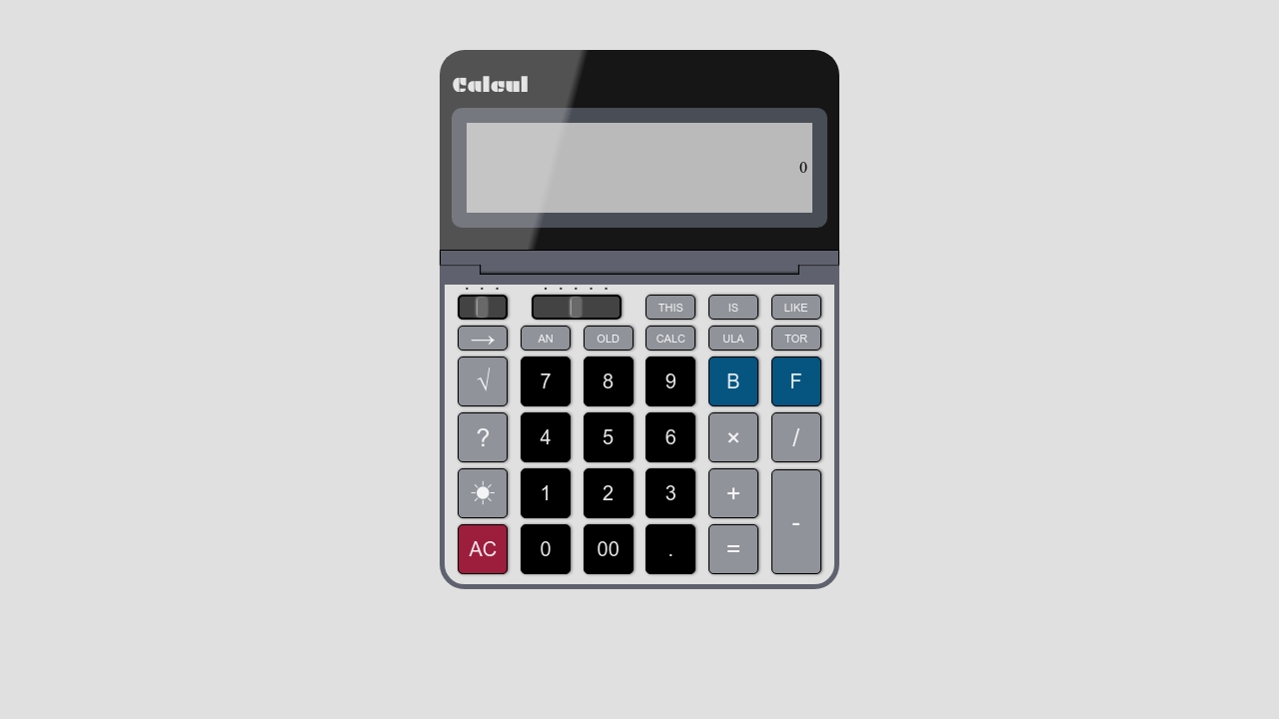
Comments