Подчёркивание строк росчерком пера (HTML код)
Подчёркивание строк росчерком пера (CSS код)
html, body {

  width: 100%;

  height: 100%;

}


body {

  display: flex;

  align-items: center;

  justify-content: center;

  font-family: "Indie Flower", cursive;

  background-color: #fffb89;

}


.app {

  max-width: 450px;

  font-size: 30px;

  line-height: 1.6em;

  text-align: justify;

}


.pen-stroke {

  position: relative;

  display: inline;

  color: #ff2727;

}

.pen-stroke svg {

  position: absolute;

  top: 1.2em;

  left: 0;

  width: 100%;

  overflow: visible;

}

.pen-stroke svg path {

  fill: none;

  stroke: #ff2727;

  stroke-linecap: round;

  stroke-linejoin: round;

  vector-effect: non-scaling-stroke;

}
Подчёркивание строк росчерком пера (JS код)
import React from 'https://cdn.skypack.dev/react';

import ReactDOM from 'https://cdn.skypack.dev/react-dom';


const random = (from, to) => Math.floor(Math.random() * (to - from) + from);


const Underline = ({ children }) => {

  const strokeWidth = random(16, 20) / 100;

  const height = random(4, 8);

  let lines = random(2, 4);

  let d = `M ${random(-5, 15)} ${random(-2, 2)}`;

  let line = 0;


  // Draw the lines

  while (line++ < lines) {if (window.CP.shouldStopExecution(0)) break;

    const y = line * (height / lines); // Draw every line lower than the previous one

    d += ` Q ${random(30, 70)}` + // The x coordinate of the curve's center

    ` ${random(y - 5, y + 5)}` + // The y coordinate of the curve's center

    ` ${line % 2 === 0 ? random(-5, 15) : random(85, 105)}` + // The x coordinate of the curve's end, alternating between right to left based on the current line number

    ` ${random(y - 2, y + 2)}`; // The y coordinate of the curve's end

  }window.CP.exitedLoop(0);


  return /*#__PURE__*/(

    React.createElement("div", { className: "pen-stroke" },

    children, /*#__PURE__*/

    React.createElement("svg", { viewBox: `0 0 100 ${height}`, height: height, xmlns: "http://www.w3.org/2000/svg", preserveAspectRatio: "none" }, /*#__PURE__*/

    React.createElement("path", { d: d, strokeWidth: `${strokeWidth}em` }))));


};


const App = () => /*#__PURE__*/

React.createElement("div", { className: "app" }, "These ", /*#__PURE__*/

React.createElement(Underline, null, "underline"), " pen strokes are ", /*#__PURE__*/React.createElement(Underline, null, "randomly"), " generated, making each of them ", /*#__PURE__*/React.createElement(Underline, null, "unique"), ". The ", /*#__PURE__*/React.createElement(Underline, null, "strokes"), " automatically take the ", /*#__PURE__*/React.createElement(Underline, null, "width"), " of the text that they ", /*#__PURE__*/React.createElement(Underline, null, "underline"), ", like this very ", /*#__PURE__*/React.createElement(Underline, null, "looooooooooooooooooong"), " word.");


ReactDOM.render( /*#__PURE__*/

React.createElement(App, null),

document.body);

//# sourceURL=pen.js
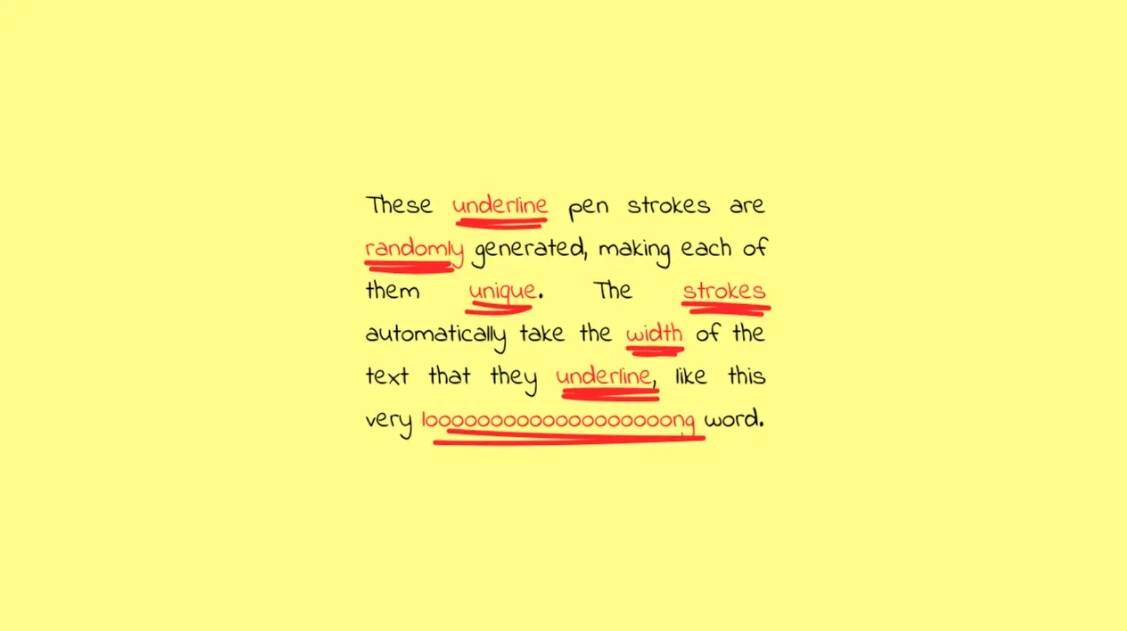
Подчёркивание строк росчерком пера (Результат кода)
Comments