Слайдер с несколькими элементами управления (Javascript) (HTML код)
<html lang="en">

    <head>

        <meta charset="UTF-8">

        <meta name="viewport" content="width=device-width, initial-scale=1.0">

        <meta http-equiv="X-UA-Compatible" content="ie=edge">


        <link href="https://fonts.googleapis.com/css2?family=Roboto:wght@300;400;500&display=swap" rel="stylesheet">

        <link rel="stylesheet" href="css/style.css">


        <title>Slider</title>

    </head>

    <body>

        <div class="container">

            <div class="slider">


                <div class="box1 box">

                    <div class="bg"></div>

                    <div class="details">

                        <h1>I'm the first Box</h1>

                        <p>

                            Lorem ipsum dolor sit amet, consectetur adipiscing

                            elit. Integer lacinia dui lectus. Donec scelerisque ipsum

                            diam, ac mattis orci pellentesque eget.

                        </p>

                        <button>Check Now</button>

                    </div>


                    <div class="illustration"><div class="inner"></div></div>

                </div>


                <div class="box2 box">

                    <div class="bg"></div>

                    <div class="details">

                        <h1>I'm the second Box</h1>

                        <p>

                            Lorem ipsum dolor sit amet, consectetur adipiscing

                            elit. Integer lacinia dui lectus. Donec scelerisque ipsum

                            diam, ac mattis orci pellentesque eget.

                        </p>

                        <button>Check Now</button>

                    </div>


                    <div class="illustration"><div class="inner"></div></div>

                </div>


                <div class="box3 box">

                    <div class="bg"></div>

                    <div class="details">

                        <h1>I'm the third Box</h1>

                        <p>

                            Lorem ipsum dolor sit amet, consectetur adipiscing

                            elit. Integer lacinia dui lectus. Donec scelerisque ipsum

                            diam, ac mattis orci pellentesque eget.

                        </p>

                        <button>Check Now</button>

                    </div>


                    <div class="illustration"><div class="inner"></div></div>

                </div>


                <div class="box4 box">

                    <div class="bg"></div>

                    <div class="details">

                        <h1>I'm the fourth Box</h1>

                        <p>

                            Lorem ipsum dolor sit amet, consectetur adipiscing

                            elit. Integer lacinia dui lectus. Donec scelerisque ipsum

                            diam, ac mattis orci pellentesque eget.

                        </p>

                        <button>Check Now</button>

                    </div>


                    <div class="illustration"><div class="inner"></div></div>

                </div>


                <div class="box5 box">

                    <div class="bg"></div>

                    <div class="details">

                        <h1>I'm the fifth Box</h1>

                        <p>

                            Lorem ipsum dolor sit amet, consectetur adipiscing

                            elit. Integer lacinia dui lectus. Donec scelerisque ipsum

                            diam, ac mattis orci pellentesque eget.

                        </p>

                        <button>Check Now</button>

                    </div>


                    <div class="illustration"><div class="inner"></div></div>

                </div>


            </div>


            <svg xmlns="http://www.w3.org/2000/svg" class="prev" width="56.898" height="91" viewBox="0 0 56.898 91"><path d="M45.5,0,91,56.9,48.452,24.068,0,56.9Z" transform="translate(0 91) rotate(-90)" fill="#fff"/></svg>

            <svg xmlns="http://www.w3.org/2000/svg" class="next" width="56.898" height="91" viewBox="0 0 56.898 91"><path d="M45.5,0,91,56.9,48.452,24.068,0,56.9Z" transform="translate(56.898) rotate(90)" fill="#fff"/></svg>

            <div class="trail">

                    <div class="box1 active">1</div>

                    <div class="box2">2</div>

                    <div class="box3">3</div>

                    <div class="box4">4</div>

                    <div class="box5">5</div>

            </div>

        </div>

        <script src="https://s3-us-west-2.amazonaws.com/s.cdpn.io/16327/gsap-latest-beta.min.js"></script>

        <script src="https://s3-us-west-2.amazonaws.com/s.cdpn.io/16327/CSSRulePlugin3.min.js"></script>


        <!-- <script src="https://cdnjs.cloudflare.com/ajax/libs/gsap/3.3.2/gsap.min.js"></script>

        <script src="https://cdnjs.cloudflare.com/ajax/libs/gsap/3.3.2/CSSRulePlugin.min.js"></script> -->

        <script src="script.js"></script>

    </body>

</html>
Слайдер с несколькими элементами управления (Javascript) (CSS код)
*,

*:before,

*:after {

  margin: 0;

  padding: 0;

  box-sizing: inherit;

}


html {

  box-sizing: border-box;

  font-family: "Roboto", sans-serif;

  font-size: 62.5%;

}

@media only screen and (max-width: 800px) {

  html {

    font-size: 57%;

  }

}


body {

  background-color: #000;

  color: #fff;

  padding: 8rem;

}

@media only screen and (max-width: 1000px) {

  body {

    padding: 0;

  }

}


.container {

  position: relative;

  overflow: hidden;

  border-radius: 5rem;

}

@media only screen and (max-width: 1000px) {

  .container {

    border-radius: 0;

  }

}


.slider {

  display: flex;

  width: 500%;

  height: 55rem;

  transition: all 0.25s ease-in;

  transform: translateX(0);

}

@media only screen and (max-width: 1000px) {

  .slider {

    height: 100vh;

  }

}

.slider .box {

  height: 100%;

  width: 100%;

  display: grid;

  grid-template-columns: repeat(2, 1fr);

  align-items: center;

  overflow: hidden;

  position: relative;

}

@media only screen and (max-width: 650px) {

  .slider .box {

    grid-template-columns: 1fr;

    grid-template-rows: repeat(2, 1fr);

  }

}

.slider .box .bg {

  padding: 2rem;

  background-color: rgba(0, 0, 0, 0.2);

  width: 55%;

  transform: skewX(7deg);

  position: absolute;

  height: 100%;

  left: -10%;

  padding-left: 20rem;

  transform-origin: 0 100%;

}

@media only screen and (max-width: 800px) {

  .slider .box .bg {

    width: 65%;

  }

}

@media only screen and (max-width: 650px) {

  .slider .box .bg {

    width: 100%;

    left: 0;

    bottom: 0;

    height: 54%;

    transform: skewX(0deg);

  }

}

.slider .box .bg::before {

  content: "";

  width: 100%;

  height: 100%;

  position: absolute;

  left: 0;

  top: 0;

  background-color: inherit;

  pointer-events: none;

  transform: skewX(10deg);

}

@media only screen and (max-width: 650px) {

  .slider .box .bg::before {

    width: 120%;

    bottom: 0;

    transform: skewX(0deg);

  }

}

.slider .box .details {

  padding: 5rem;

  padding-left: 10rem;

  z-index: 100;

  grid-column: 1/span 1;

  grid-row: 1/-1;

}

@media only screen and (max-width: 650px) {

  .slider .box .details {

    grid-row: 2/span 1;

    grid-column: 1/-1;

    text-align: center;

    padding: 2rem;

    transform: translateY(-9rem);

  }

}

.slider .box .details h1 {

  font-size: 3.5rem;

  font-weight: 500;

  margin-bottom: 0.5rem;

}

.slider .box .details p {

  display: inline-block;

  font-size: 1.3rem;

  color: #B5B4B4;

  margin-bottom: 2rem;

  margin-right: 5rem;

}

@media only screen and (max-width: 800px) {

  .slider .box .details p {

    margin-right: 0;

  }

}

.slider .box .details button {

  padding: 1rem 3rem;

  color: #fff;

  border-radius: 2rem;

  outline: none;

  border: none;

  cursor: pointer;

  transition: all 0.3s ease;

}

.slider .box .details button:hover {

  opacity: 0.8;

}

.slider .box .details button:focus {

  outline: none;

  border: none;

}

.slider .box1 {

  background-color: #500033;

}

.slider .box1 .illustration .inner {

  background-color: #FF0077;

}

.slider .box1 .illustration .inner::after, .slider .box1 .illustration .inner::before {

  background-color: rgba(255, 0, 119, 0.4);

}

.slider .box1 button {

  background-color: #FF0077;

}

.slider .box2 {

  background-color: #000050;

}

.slider .box2 .illustration .inner {

  background-color: #0033FF;

}

.slider .box2 .illustration .inner::after, .slider .box2 .illustration .inner::before {

  background-color: rgba(0, 51, 255, 0.4);

}

.slider .box2 button {

  background-color: #0033FF;

}

.slider .box3 {

  background-color: #00501D;

}

.slider .box3 .illustration .inner {

  background-color: #00FF44;

}

.slider .box3 .illustration .inner::after, .slider .box3 .illustration .inner::before {

  background-color: rgba(0, 255, 68, 0.4);

}

.slider .box3 button {

  background-color: #00FF44;

}

.slider .box4 {

  background-color: #554D00;

}

.slider .box4 .illustration .inner {

  background-color: #FF4E00;

}

.slider .box4 .illustration .inner::after, .slider .box4 .illustration .inner::before {

  background-color: rgba(255, 78, 0, 0.4);

}

.slider .box4 button {

  background-color: #FF4E00;

}

.slider .box5 {

  background-color: #300050;

}

.slider .box5 .illustration .inner {

  background-color: #8000FF;

}

.slider .box5 .illustration .inner::after, .slider .box5 .illustration .inner::before {

  background-color: rgba(128, 0, 255, 0.4);

}

.slider .box5 button {

  background-color: #8000FF;

}

.slider .illustration {

  grid-column: 2/-1;

  grid-row: 1/-1;

  justify-self: center;

}

@media only screen and (max-width: 650px) {

  .slider .illustration {

    grid-row: 1/span 1;

    grid-column: 1/-1;

    display: flex;

    justify-content: center;

    align-items: center;

  }

}

.slider .illustration div {

  height: 25rem;

  width: 18rem;

  border-radius: 3rem;

  background-color: #FF0077;

  position: relative;

  transform: skewX(-10deg);

}

@media only screen and (max-width: 800px) {

  .slider .illustration div {

    height: 20rem;

    width: 15rem;

  }

}

.slider .illustration div::after, .slider .illustration div::before {

  content: "";

  position: absolute;

  height: 100%;

  width: 100%;

  border-radius: 3rem;

  top: 0;

  left: 0;

}

.slider .illustration div::after {

  transform: translate(4rem, -1rem);

}

.slider .illustration div::before {

  transform: translate(2rem, -2rem);

}


.prev,

.next,

.trail {

  z-index: 10000;

  position: absolute;

}


.prev,

.next {

  width: 4rem;

  cursor: pointer;

  opacity: 0.2;

  transition: all 0.3s ease;

}

@media only screen and (max-width: 650px) {

  .prev,

.next {

    display: none;

  }

}

.prev:hover,

.next:hover {

  opacity: 1;

}


.prev {

  top: 50%;

  left: 2%;

  transform: translateY(-50%);

}


.next {

  top: 50%;

  right: 2%;

  transform: translateY(-50%);

}


.trail {

  bottom: 5%;

  left: 50%;

  transform: translateX(-50%);

  width: 60%;

  display: grid;

  grid-template-columns: repeat(5, 1fr);

  gap: 1rem;

  text-align: center;

  font-size: 1.5rem;

}

@media only screen and (max-width: 650px) {

  .trail {

    width: 90%;

    bottom: 13%;

  }

}

.trail div {

  padding: 2rem;

  border-top: 3px solid #fff;

  cursor: pointer;

  opacity: 0.3;

  transition: all 0.3s ease;

}

.trail div:hover {

  opacity: 0.6;

}

@media only screen and (max-width: 650px) {

  .trail div {

    padding: 1rem;

  }

}


.active {

  opacity: 1 !important;

}
Слайдер с несколькими элементами управления (Javascript) (JS код)
// Slider(all Slides in a container)

const slider = document.querySelector(".slider");

// All trails

const trail = document.querySelector(".trail").querySelectorAll("div");


// Transform value

let value = 0;

// trail index number

let trailValue = 0;

// interval (Duration)

let interval = 4000;


// Function to slide forward

const slide = condition => {

  // CLear interval

  clearInterval(start);

  // update value and trailValue

  condition === "increase" ? initiateINC() : initiateDEC();

  // move slide

  move(value, trailValue);

  // Restart Animation

  animate();

  // start interal for slides back

  start = setInterval(() => slide("increase"), interval);

};


// function for increase(forward, next) configuration

const initiateINC = () => {

  // Remove active from all trails

  trail.forEach(cur => cur.classList.remove("active"));

  // increase transform value

  value === 80 ? value = 0 : value += 20;

  // update trailValue based on value

  trailUpdate();

};


// function for decrease(backward, previous) configuration

const initiateDEC = () => {

  // Remove active from all trails

  trail.forEach(cur => cur.classList.remove("active"));

  // decrease transform value

  value === 0 ? value = 80 : value -= 20;

  // update trailValue based on value

  trailUpdate();

};


// function to transform slide

const move = (S, T) => {

  // transform slider

  slider.style.transform = `translateX(-${S}%)`;

  //add active class to the current trail

  trail[T].classList.add("active");

};


const tl = gsap.timeline({ defaults: { duration: 0.6, ease: "power2.inOut" } });

tl.from(".bg", { x: "-100%", opacity: 0 }).

from("p", { opacity: 0 }, "-=0.3").

from("h1", { opacity: 0, y: "30px" }, "-=0.3").

from("button", { opacity: 0, y: "-40px" }, "-=0.8");


// function to restart animation

const animate = () => tl.restart();


// function to update trailValue based on slide value

const trailUpdate = () => {

  if (value === 0) {

    trailValue = 0;

  } else if (value === 20) {

    trailValue = 1;

  } else if (value === 40) {

    trailValue = 2;

  } else if (value === 60) {

    trailValue = 3;

  } else {

    trailValue = 4;

  }

};


// Start interval for slides

let start = setInterval(() => slide("increase"), interval);


// Next  and  Previous button function (SVG icon with different classes)

document.querySelectorAll("svg").forEach(cur => {

  // Assign function based on the class Name("next" and "prev")

  cur.addEventListener("click", () => cur.classList.contains("next") ? slide("increase") : slide("decrease"));

});


// function to slide when trail is clicked

const clickCheck = e => {

  // CLear interval

  clearInterval(start);

  // remove active class from all trails

  trail.forEach(cur => cur.classList.remove("active"));

  // Get selected trail

  const check = e.target;

  // add active class

  check.classList.add("active");


  // Update slide value based on the selected trail

  if (check.classList.contains("box1")) {

    value = 0;

  } else if (check.classList.contains("box2")) {

    value = 20;

  } else if (check.classList.contains("box3")) {

    value = 40;

  } else if (check.classList.contains("box4")) {

    value = 60;

  } else {

    value = 80;

  }

  // update trail based on value

  trailUpdate();

  // transfrom slide

  move(value, trailValue);

  // start animation

  animate();

  // start interval

  start = setInterval(() => slide("increase"), interval);

};


// Add function to all trails

trail.forEach(cur => cur.addEventListener("click", ev => clickCheck(ev)));


// Mobile touch Slide Section

const touchSlide = (() => {

  let start, move, change, sliderWidth;


  // Do this on initial touch on screen

  slider.addEventListener("touchstart", e => {

    // get the touche position of X on the screen

    start = e.touches[0].clientX;

    // (each slide with) the width of the slider container divided by the number of slides

    sliderWidth = slider.clientWidth / trail.length;

  });


  // Do this on touchDrag on screen

  slider.addEventListener("touchmove", e => {

    // prevent default function

    e.preventDefault();

    // get the touche position of X on the screen when dragging stops

    move = e.touches[0].clientX;

    // Subtract initial position from end position and save to change variabla

    change = start - move;

  });


  const mobile = e => {

    // if change is greater than a quarter of sliderWidth, next else Do NOTHING

    change > sliderWidth / 4 ? slide("increase") : null;

    // if change * -1 is greater than a quarter of sliderWidth, prev else Do NOTHING

    change * -1 > sliderWidth / 4 ? slide("decrease") : null;

    // reset all variable to 0

    [start, move, change, sliderWidth] = [0, 0, 0, 0];

  };

  // call mobile on touch end

  slider.addEventListener("touchend", mobile);

})();

//# sourceURL=pen.js
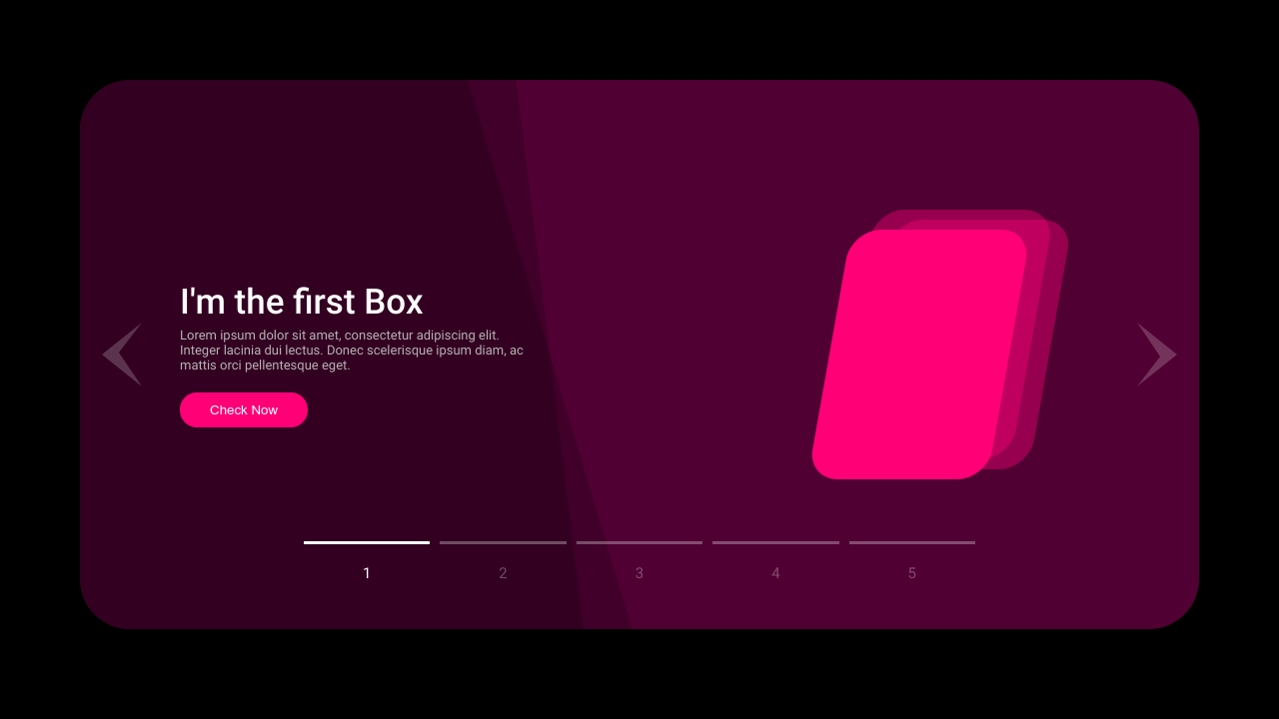
Слайдер с несколькими элементами управления (Javascript) (Результат кода)
Comments