Android: Как сделать все элементы внутри LinearLayout одинакового размера?
Я хотел бы создать диалоговое окно для отображения заголовка видео и тегов. Ниже текста я хотел бы добавить кнопки просмотра, редактирования и удаления и сделать эти элементы одинакового размера. Кто-нибудь знает, как изменить .xml-файл макета для того, чтобы сделать элементы внутри LinearView одинакового размера?
текущий файл макета выглядит так:
<LinearLayout

    xmlns:android="http://schemas.android.com/apk/res/android"

    android:layout_width="fill_parent"

    android:layout_height="wrap_content"

    android:orientation="vertical">


    <LinearLayout

          android:layout_width="wrap_content"

          android:layout_height="wrap_content"

          android:orientation="vertical">


          <TextView

              android:layout_width="wrap_content"

              android:layout_height="wrap_content"

              android:id="@+id/txtTitle" android:text="[Title]" >

          </TextView>


          <TextView

              android:layout_width="wrap_content"

              android:layout_height="wrap_content"

              android:id="@+id/txtTags"

              android:text="[Tags]" >

          </TextView>


    </LinearLayout>


    <LinearLayout

        android:layout_width="fill_parent"

        android:layout_height="wrap_content"

        android:orientation="horizontal">


        <Button

           android:layout_width="wrap_content"

           android:layout_height="wrap_content"

           android:id="@+id/btnPlay"

           android:text="View">

        </Button>


        <Button

            android:layout_width="wrap_content"

            android:layout_height="wrap_content"

            android:id="@+id/btnEdit"

            android:text="Edit">

        </Button>


        <Button

            android:layout_width="wrap_content"

            android:layout_height="wrap_content"

            android:id="@+id/btnDelete"

            android:text="Delete">

        </Button>


    </LinearLayout>


</LinearLayout>
Я был бы признателен, если бы кто-нибудь мог показать решение, изменив содержимое вставленного файла.
спасибо!
3 ответов:
использовать
android:layout_width="0px"иandroid:layout_weight="1"на троихButtonы. Говорит, что кнопки должны занимать не более 0 точек, но три из них должны разделять все дополнительное пространство между ними. Это должно дать вам визуальный эффект вы хотите.
другой способ-сделать
android:layout_width="fill_parent"иandroid:layout_weight="1"это также работает отлично!!!
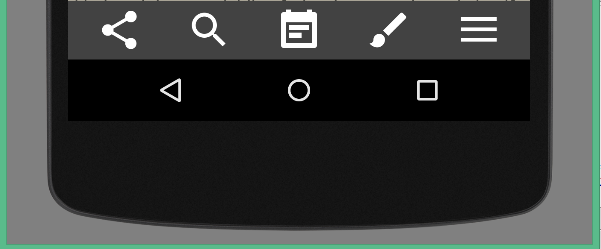
использовать LinearLayout С weightSum и создавать элементы с равными layout_weight. Вот вам пример ...
<LinearLayout
    android:layout_width="match_parent"
    android:layout_height="wrap_content"
    android:weightSum="5">

    <ImageView
        android:layout_width="0dp"
        android:layout_height="wrap_content"
        android:layout_weight="1"
        android:src="@drawable/ic_share_white_36dp"/>

    <ImageView
        android:layout_width="0dp"
        android:layout_height="wrap_content"
        android:layout_weight="1"
        android:src="@drawable/ic_search_white_36dp"/>

    <ImageView
        android:layout_width="0dp"
        android:layout_height="wrap_content"
        android:layout_weight="1"
        android:src="@drawable/ic_event_note_white_36dp"/>

    <ImageView
        android:layout_width="0dp"
        android:layout_height="wrap_content"
        android:layout_weight="1"
        android:src="@drawable/ic_brush_white_36dp"/>

    <ImageView
        android:layout_width="0dp"
        android:layout_height="wrap_content"
        android:layout_weight="1"
        android:src="@drawable/ic_menu_white_36dp"/>
</LinearLayout>
Итак, весовая сумма всех элементов равна 5. Вот скриншот ...
отметим, что Google Material Design значки. Надеюсь, что это полезно.
Comments