Android-LinearLayout горизонтальный с обертыванием детей
есть ли свойство для установки для LinearLayout Android, которое позволит ему правильно обернуть дочерние элементы управления?
смысл - у меня есть изменчивое количество детей и хотел бы выложить их горизонтально, как:
Example: Control1, Control2, Control3, ...
Я делаю это путем установления:
ll.setOrientation(LinearLayout.HORIZONTAL);

foreach (Child c in children)

  ll.addView(c);
однако, если у меня есть большое количество детей, последний получает отрезает, вместо того, чтобы перейти к следующей строке.
есть идеи, как это можно исправить?
7 ответов:
по состоянию на май 2016 года Google создал свой собственный
FlexBoxLayout, который должен решить вашу проблему.вы можете найти репозиторий GitHub здесь:https://github.com/google/flexbox-layout
Это должно быть то, что вы хотите:
import android.content.Context;
import android.util.AttributeSet;
import android.view.View;
import android.view.ViewGroup;

/**
 *
 * @author RAW
 */
public class FlowLayout extends ViewGroup {

    private int line_height;

    public static class LayoutParams extends ViewGroup.LayoutParams {

        public final int horizontal_spacing;
        public final int vertical_spacing;

        /**
         * @param horizontal_spacing Pixels between items, horizontally
         * @param vertical_spacing Pixels between items, vertically
         */
        public LayoutParams(int horizontal_spacing, int vertical_spacing) {
            super(0, 0);
            this.horizontal_spacing = horizontal_spacing;
            this.vertical_spacing = vertical_spacing;
        }
    }

    public FlowLayout(Context context) {
        super(context);
    }

    public FlowLayout(Context context, AttributeSet attrs) {
        super(context, attrs);
    }

    @Override
    protected void onMeasure(int widthMeasureSpec, int heightMeasureSpec) {
        assert (MeasureSpec.getMode(widthMeasureSpec) != MeasureSpec.UNSPECIFIED);

        final int width = MeasureSpec.getSize(widthMeasureSpec) - getPaddingLeft() - getPaddingRight();
        int height = MeasureSpec.getSize(heightMeasureSpec) - getPaddingTop() - getPaddingBottom();
        final int count = getChildCount();
        int line_height = 0;

        int xpos = getPaddingLeft();
        int ypos = getPaddingTop();

        int childHeightMeasureSpec;
        if (MeasureSpec.getMode(heightMeasureSpec) == MeasureSpec.AT_MOST) {
            childHeightMeasureSpec = MeasureSpec.makeMeasureSpec(height, MeasureSpec.AT_MOST);
        } else {
            childHeightMeasureSpec = MeasureSpec.makeMeasureSpec(0, MeasureSpec.UNSPECIFIED);
        }


        for (int i = 0; i < count; i++) {
            final View child = getChildAt(i);
            if (child.getVisibility() != GONE) {
                final LayoutParams lp = (LayoutParams) child.getLayoutParams();
                child.measure(MeasureSpec.makeMeasureSpec(width, MeasureSpec.AT_MOST), childHeightMeasureSpec);
                final int childw = child.getMeasuredWidth();
                line_height = Math.max(line_height, child.getMeasuredHeight() + lp.vertical_spacing);

                if (xpos + childw > width) {
                    xpos = getPaddingLeft();
                    ypos += line_height;
                }

                xpos += childw + lp.horizontal_spacing;
            }
        }
        this.line_height = line_height;

        if (MeasureSpec.getMode(heightMeasureSpec) == MeasureSpec.UNSPECIFIED) {
            height = ypos + line_height;

        } else if (MeasureSpec.getMode(heightMeasureSpec) == MeasureSpec.AT_MOST) {
            if (ypos + line_height < height) {
                height = ypos + line_height;
            }
        }
        setMeasuredDimension(width, height);
    }

    @Override
    protected ViewGroup.LayoutParams generateDefaultLayoutParams() {
        return new LayoutParams(1, 1); // default of 1px spacing
    }

    @Override
    protected android.view.ViewGroup.LayoutParams generateLayoutParams(
        android.view.ViewGroup.LayoutParams p) {
        return new LayoutParams(1, 1, p);
    }

    @Override
    protected boolean checkLayoutParams(ViewGroup.LayoutParams p) {
        if (p instanceof LayoutParams) {
            return true;
        }
        return false;
    }

    @Override
    protected void onLayout(boolean changed, int l, int t, int r, int b) {
        final int count = getChildCount();
        final int width = r - l;
        int xpos = getPaddingLeft();
        int ypos = getPaddingTop();

        for (int i = 0; i < count; i++) {
            final View child = getChildAt(i);
            if (child.getVisibility() != GONE) {
                final int childw = child.getMeasuredWidth();
                final int childh = child.getMeasuredHeight();
                final LayoutParams lp = (LayoutParams) child.getLayoutParams();
                if (xpos + childw > width) {
                    xpos = getPaddingLeft();
                    ypos += line_height;
                }
                child.layout(xpos, ypos, xpos + childw, ypos + childh);
                xpos += childw + lp.horizontal_spacing;
            }
        }
    }
}
и XML-файл
/* you must write your package name and class name */
<org.android.FlowLayout
                android:id="@+id/flow_layout"
                android:layout_marginLeft="5dip"
                android:layout_width="fill_parent"
                android:layout_height="wrap_content"/>
для тех, кто нуждается в таком поведении:
private void populateLinks(LinearLayout ll, ArrayList<Sample> collection, String header) {

    Display display = getWindowManager().getDefaultDisplay();
    int maxWidth = display.getWidth() - 10;

    if (collection.size() > 0) {
        LinearLayout llAlso = new LinearLayout(this);
        llAlso.setLayoutParams(new LayoutParams(LayoutParams.FILL_PARENT,
                LayoutParams.WRAP_CONTENT));
        llAlso.setOrientation(LinearLayout.HORIZONTAL);

        TextView txtSample = new TextView(this);
        txtSample.setText(header);

        llAlso.addView(txtSample);
        txtSample.measure(0, 0);

        int widthSoFar = txtSample.getMeasuredWidth();
        for (Sample samItem : collection) {
            TextView txtSamItem = new TextView(this, null,
                    android.R.attr.textColorLink);
            txtSamItem.setText(samItem.Sample);
            txtSamItem.setPadding(10, 0, 0, 0);
            txtSamItem.setTag(samItem);
            txtSamItem.setOnClickListener(new OnClickListener() {
                @Override
                public void onClick(View v) {
                    TextView self = (TextView) v;
                    Sample ds = (Sample) self.getTag();

                    Intent myIntent = new Intent();
                    myIntent.putExtra("link_info", ds.Sample);
                    setResult("link_clicked", myIntent);
                    finish();
                }
            });

            txtSamItem.measure(0, 0);
            widthSoFar += txtSamItem.getMeasuredWidth();

            if (widthSoFar >= maxWidth) {
                ll.addView(llAlso);

                llAlso = new LinearLayout(this);
                llAlso.setLayoutParams(new LayoutParams(
                        LayoutParams.FILL_PARENT,
                        LayoutParams.WRAP_CONTENT));
                llAlso.setOrientation(LinearLayout.HORIZONTAL);

                llAlso.addView(txtSamItem);
                widthSoFar = txtSamItem.getMeasuredWidth();
            } else {
                llAlso.addView(txtSamItem);
            }
        }

        ll.addView(llAlso);
    }
}
старый вопрос, но в случае, если кто-то окажется здесь, две библиотеки, которые делают именно это:
ищем решение для аналогичной, но более простой задачи, то есть для обертывания дочернего текстового контента в горизонтальной компоновке. решение kape123 работает отлично. Но найти более простой для этой проблемы, используя ClickableSpan. Может быть, это может быть полезно для какого-то простого случая. фрагмент:
        String[] stringSource = new String[sourceList.size()];
        for (int i = 0; c < sourceList.size(); i++) {
            String text = sourceList.get(i);
            stringSource[i] = text;
        }

        SpannableString totalContent = new SpannableString(TextUtils.join(",", stringSource));
        int start = 0;
        for (int j = 0; j < stringSource.length(); j++) {
            final String text = stringSource[j];
            ClickableSpan span = new ClickableSpan() {

        @Override
                public void updateDrawState(TextPaint ds) {
                    ds.setUnderlineText(true);
                    ds.setColor(getResources().getColor(R.color.green));
                }
                @Override
                public void onClick(View widget) {
                    // the text clicked
                }
            };
    int end = (start += text.length());
            totalContent.setSpan(span, start, end, 0);
            star = end + 1;
        }

        TextView wrapperView = (TextView) findViewById(horizontal_container_id);
        wrapperView.setMovementMethod(LinkMovementMethod.getInstance());

        wrapperView.setText(totalContent, BufferType.SPANNABLE);
    }
//this method will add image view to liner grid and warp it if no space in new child LinearLayout grid
private void addImageToLinyerLayout(LinearLayout ll , ImageView v)
{
    //set the padding and margin and weight
    v.setPadding(5, 5, 5, 5);

    Display display = getWindowManager().getDefaultDisplay();
    int maxWidth = display.getWidth() - 10;
    int maxChildeNum = (int) ( maxWidth / (110)) ;
    Toast.makeText(getBaseContext(), "c" + v.getWidth() ,
            Toast.LENGTH_LONG).show();
    //loop through all child of the LinearLayout
    for (int i = 0; i < ll.getChildCount(); i++) {
        View chidv = ll.getChildAt(i);
        Class c = chidv.getClass();
        if (c == LinearLayout.class) {
            //here we are in the child lay out check to add the imageView if there is space
            //Available else we will add it to new linear layout
            LinearLayout chidvL = (LinearLayout)chidv;
            if(chidvL.getChildCount() < maxChildeNum)
            {
                chidvL.addView(v);
                return;
            }
        } else{
           continue;
        }
    }

    //if you reached here this means there was no roam for adding view so we will
    //add new linear layout
    LinearLayout childLinyer = new LinearLayout(this);
    childLinyer.setLayoutParams(new LayoutParams(LayoutParams.FILL_PARENT,
            LayoutParams.WRAP_CONTENT));

    childLinyer.setOrientation(LinearLayout.HORIZONTAL);
    ll.addView(childLinyer);
    childLinyer.addView(v);

}
вышеуказанный метод добавит imgeview бок о бок, как agrid и в вашем макете
  <LinearLayout
    xmlns:android="http://schemas.android.com/apk/res/android"
    android:layout_width="fill_parent"
    android:layout_height="wrap_content"
    android:orientation="vertical"
    android:id="@+id/imageslayout"
    ></LinearLayout>
я публикую это решение может ли оно помочь кому-то и сэкономить один раз, и я использую его в своем приложении
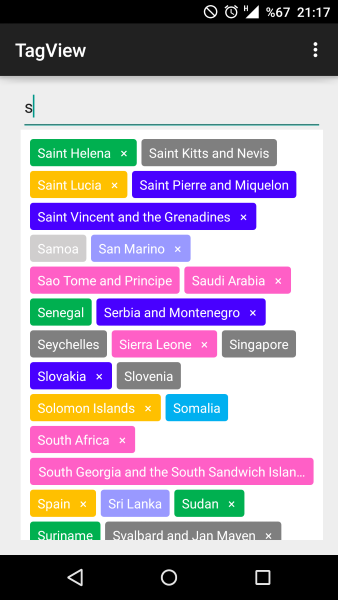
Я в конечном итоге с помощью TagView:
<com.cunoraz.tagview.TagView
        android:id="@+id/tag_group"
        android:layout_width="match_parent"
        android:layout_height="match_parent"
        android:layout_margin="10dp" />


  TagView tagGroup = (TagView)findviewById(R.id.tag_view);
 //You can add one tag
 tagGroup.addTag(Tag tag);
 //You can add multiple tag via ArrayList
 tagGroup.addTags(ArrayList<Tag> tags);
 //Via string array
 addTags(String[] tags);


   //set click listener
      tagGroup.setOnTagClickListener(new OnTagClickListener() {
            @Override
            public void onTagClick(Tag tag, int position) {
            }
        });

   //set delete listener
            tagGroup.setOnTagDeleteListener(new OnTagDeleteListener() {
            @Override
            public void onTagDeleted(final TagView view, final Tag tag, final int position) {
            }
        });
Comments