Эквивалент редактируемого ComboBox в WinRT?
Стандартный (настольный) Windows combobox имеет три стиля: простой, выпадающий и выпадающий список. Выпадающий список работает как элемент управления редактированием и combobox, в то время как выпадающий список не позволяет редактировать.
Я что-то пропустил, или элемент управления XAML ComboBox в приложении магазина Windows 8 поддерживает только стиль выпадающего списка?
Я был на полпути к реализации чего-то, когда я столкнулся с этим, и чем больше я смотрю, тем больше кажется, что это просто не поддерживается.
Действительно ли мне нужно заменить ComboBoxes в моих экранах с помощью элемента управления редактирования с последующим списком?
Фу.
8 ответов:
Благодаря Эдварду.хо.ответ tpe я написал себе небольшой EditableComboBox, используя
TextBoxвнутриComboBoxItem. Если вы хотите использовать его несколько раз, было бы лучше создать UserControl.Однако вот как я это сделал:
Стиль:
<SolidColorBrush x:Key="TransparentBrush" Color="Transparent"/> <Style x:Key="ComboBoxItemTextBox" TargetType="TextBox"> <Setter Property="MinWidth" Value="{ThemeResource TextControlThemeMinWidth}"/> <Setter Property="MinHeight" Value="{ThemeResource TextControlThemeMinHeight}"/> <Setter Property="Foreground" Value="{ThemeResource TextBoxForegroundThemeBrush}"/> <Setter Property="Background" Value="{StaticResource TransparentBrush}"/> <Setter Property="BorderBrush" Value="{StaticResource TransparentBrush}"/> <Setter Property="SelectionHighlightColor" Value="{ThemeResource TextSelectionHighlightColorThemeBrush}"/> <Setter Property="BorderThickness" Value="0"/> <Setter Property="FontFamily" Value="{ThemeResource ContentControlThemeFontFamily}"/> <Setter Property="FontSize" Value="{ThemeResource ControlContentThemeFontSize}"/> <Setter Property="ScrollViewer.HorizontalScrollBarVisibility" Value="Hidden"/> <Setter Property="ScrollViewer.VerticalScrollBarVisibility" Value="Hidden"/> <Setter Property="ScrollViewer.IsDeferredScrollingEnabled" Value="False"/> <Setter Property="Padding" Value="{ThemeResource TextControlThemePadding}"/> <Setter Property="Margin" Value="-10,0,0,0"/> <Setter Property="Template"> <Setter.Value> <ControlTemplate TargetType="TextBox"> <Grid> <Grid.Resources> <Style x:Name="DeleteButtonStyle" TargetType="Button"> <Setter Property="Template"> <Setter.Value> <ControlTemplate TargetType="Button"> <Grid> <VisualStateManager.VisualStateGroups> <VisualStateGroup x:Name="CommonStates"> <VisualState x:Name="Normal"/> <VisualState x:Name="PointerOver"> <Storyboard> <ObjectAnimationUsingKeyFrames Storyboard.TargetProperty="Background" Storyboard.TargetName="BackgroundElement"> <DiscreteObjectKeyFrame KeyTime="0" Value="{ThemeResource TextBoxButtonPointerOverBackgroundThemeBrush}"/> </ObjectAnimationUsingKeyFrames> <ObjectAnimationUsingKeyFrames Storyboard.TargetProperty="BorderBrush" Storyboard.TargetName="BorderElement"> <DiscreteObjectKeyFrame KeyTime="0" Value="{ThemeResource TextBoxButtonPointerOverBorderThemeBrush}"/> </ObjectAnimationUsingKeyFrames> <ObjectAnimationUsingKeyFrames Storyboard.TargetProperty="Foreground" Storyboard.TargetName="GlyphElement"> <DiscreteObjectKeyFrame KeyTime="0" Value="{ThemeResource TextBoxButtonPointerOverForegroundThemeBrush}"/> </ObjectAnimationUsingKeyFrames> </Storyboard> </VisualState> <VisualState x:Name="Pressed"> <Storyboard> <ObjectAnimationUsingKeyFrames Storyboard.TargetProperty="Background" Storyboard.TargetName="BackgroundElement"> <DiscreteObjectKeyFrame KeyTime="0" Value="{ThemeResource TextBoxButtonPressedBackgroundThemeBrush}"/> </ObjectAnimationUsingKeyFrames> <ObjectAnimationUsingKeyFrames Storyboard.TargetProperty="BorderBrush" Storyboard.TargetName="BorderElement"> <DiscreteObjectKeyFrame KeyTime="0" Value="{ThemeResource TextBoxButtonPressedBorderThemeBrush}"/> </ObjectAnimationUsingKeyFrames> <ObjectAnimationUsingKeyFrames Storyboard.TargetProperty="Foreground" Storyboard.TargetName="GlyphElement"> <DiscreteObjectKeyFrame KeyTime="0" Value="{ThemeResource TextBoxButtonPressedForegroundThemeBrush}"/> </ObjectAnimationUsingKeyFrames> </Storyboard> </VisualState> <VisualState x:Name="Disabled"> <Storyboard> <DoubleAnimation Duration="0" To="0" Storyboard.TargetProperty="Opacity" Storyboard.TargetName="BackgroundElement"/> <DoubleAnimation Duration="0" To="0" Storyboard.TargetProperty="Opacity" Storyboard.TargetName="BorderElement"/> </Storyboard> </VisualState> </VisualStateGroup> </VisualStateManager.VisualStateGroups> <Border x:Name="BorderElement" BorderBrush="{ThemeResource TextBoxButtonBorderThemeBrush}" BorderThickness="{TemplateBinding BorderThickness}"/> <Border x:Name="BackgroundElement" Background="{ThemeResource TextBoxButtonBackgroundThemeBrush}" Margin="{TemplateBinding BorderThickness}"> <TextBlock x:Name="GlyphElement" AutomationProperties.AccessibilityView="Raw" Foreground="{ThemeResource TextBoxButtonForegroundThemeBrush}" FontStyle="Normal" FontFamily="{ThemeResource SymbolThemeFontFamily}" HorizontalAlignment="Center" Text="" VerticalAlignment="Center"/> </Border> </Grid> </ControlTemplate> </Setter.Value> </Setter> </Style> </Grid.Resources> <Grid.ColumnDefinitions> <ColumnDefinition Width="*"/> <ColumnDefinition Width="Auto"/> </Grid.ColumnDefinitions> <Grid.RowDefinitions> <RowDefinition Height="Auto"/> <RowDefinition Height="*"/> </Grid.RowDefinitions> <VisualStateManager.VisualStateGroups> <VisualStateGroup x:Name="CommonStates"> <VisualState x:Name="Disabled"> <Storyboard> <ObjectAnimationUsingKeyFrames Storyboard.TargetProperty="Background" Storyboard.TargetName="BackgroundElement"> <DiscreteObjectKeyFrame KeyTime="0" Value="{ThemeResource TextBoxDisabledBackgroundThemeBrush}"/> </ObjectAnimationUsingKeyFrames> <ObjectAnimationUsingKeyFrames Storyboard.TargetProperty="BorderBrush" Storyboard.TargetName="BorderElement"> <DiscreteObjectKeyFrame KeyTime="0" Value="{ThemeResource TextBoxDisabledBorderThemeBrush}"/> </ObjectAnimationUsingKeyFrames> <ObjectAnimationUsingKeyFrames Storyboard.TargetProperty="Foreground" Storyboard.TargetName="ContentElement"> <DiscreteObjectKeyFrame KeyTime="0" Value="{ThemeResource TextBoxDisabledForegroundThemeBrush}"/> </ObjectAnimationUsingKeyFrames> <ObjectAnimationUsingKeyFrames Storyboard.TargetProperty="Foreground" Storyboard.TargetName="PlaceholderTextContentPresenter"> <DiscreteObjectKeyFrame KeyTime="0" Value="{ThemeResource TextBoxDisabledForegroundThemeBrush}"/> </ObjectAnimationUsingKeyFrames> </Storyboard> </VisualState> <VisualState x:Name="Normal"> <Storyboard> <DoubleAnimation Duration="0" To="{ThemeResource TextControlBackgroundThemeOpacity}" Storyboard.TargetProperty="Opacity" Storyboard.TargetName="BackgroundElement"/> <DoubleAnimation Duration="0" To="{ThemeResource TextControlBorderThemeOpacity}" Storyboard.TargetProperty="Opacity" Storyboard.TargetName="BorderElement"/> </Storyboard> </VisualState> <VisualState x:Name="PointerOver"> <Storyboard> <DoubleAnimation Duration="0" To="{ThemeResource TextControlPointerOverBackgroundThemeOpacity}" Storyboard.TargetProperty="Opacity" Storyboard.TargetName="BackgroundElement"/> <DoubleAnimation Duration="0" To="{ThemeResource TextControlPointerOverBorderThemeOpacity}" Storyboard.TargetProperty="Opacity" Storyboard.TargetName="BorderElement"/> </Storyboard> </VisualState> <VisualState x:Name="Focused"/> </VisualStateGroup> <VisualStateGroup x:Name="ButtonStates"> <VisualState x:Name="ButtonVisible"/> <VisualState x:Name="ButtonCollapsed"/> </VisualStateGroup> </VisualStateManager.VisualStateGroups> <Border x:Name="BackgroundElement" Background="{TemplateBinding Background}" Grid.ColumnSpan="2" Margin="{TemplateBinding BorderThickness}" Grid.Row="1" Grid.RowSpan="1"/> <Border x:Name="BorderElement" BorderBrush="{TemplateBinding BorderBrush}" BorderThickness="{TemplateBinding BorderThickness}" Grid.ColumnSpan="2" Grid.Row="1" Grid.RowSpan="1"/> <ContentPresenter x:Name="HeaderContentPresenter" Grid.ColumnSpan="2" ContentTemplate="{TemplateBinding HeaderTemplate}" Content="{TemplateBinding Header}" Foreground="{ThemeResource TextBoxForegroundHeaderThemeBrush}" FontWeight="Semilight" Margin="0,4,0,4" Grid.Row="0"/> <ScrollViewer x:Name="ContentElement" AutomationProperties.AccessibilityView="Raw" HorizontalScrollMode="{TemplateBinding ScrollViewer.HorizontalScrollMode}" HorizontalScrollBarVisibility="{TemplateBinding ScrollViewer.HorizontalScrollBarVisibility}" IsTabStop="False" IsHorizontalRailEnabled="{TemplateBinding ScrollViewer.IsHorizontalRailEnabled}" IsVerticalRailEnabled="{TemplateBinding ScrollViewer.IsVerticalRailEnabled}" IsDeferredScrollingEnabled="{TemplateBinding ScrollViewer.IsDeferredScrollingEnabled}" Margin="{TemplateBinding BorderThickness}" Padding="{TemplateBinding Padding}" Grid.Row="1" VerticalScrollBarVisibility="{TemplateBinding ScrollViewer.VerticalScrollBarVisibility}" VerticalScrollMode="{TemplateBinding ScrollViewer.VerticalScrollMode}" ZoomMode="Disabled"/> <ContentControl x:Name="PlaceholderTextContentPresenter" Grid.ColumnSpan="2" Content="{TemplateBinding PlaceholderText}" Foreground="{ThemeResource TextBoxPlaceholderTextThemeBrush}" IsHitTestVisible="False" IsTabStop="False" Margin="{TemplateBinding BorderThickness}" Padding="{TemplateBinding Padding}" Grid.Row="1"/> <Button x:Name="DeleteButton" BorderThickness="{TemplateBinding BorderThickness}" Grid.Column="1" FontSize="{TemplateBinding FontSize}" IsTabStop="False" Grid.Row="1" Style="{StaticResource DeleteButtonStyle}" Visibility="Collapsed" VerticalAlignment="Stretch"/> </Grid> </ControlTemplate> </Setter.Value> </Setter> </Style>ComboBox:
<ComboBox SelectionChanged="ComboBox_SelectionChanged">
    <ComboBoxItem IsSelected="True">
        <TextBox x:Name="tbComboBox" Style="{StaticResource ComboBoxItemTextBox}" KeyDown="tbComboBox_KeyDown"/>
    </ComboBoxItem>
    <ComboBoxItem>Item 1</ComboBoxItem>
    <ComboBoxItem>Item 2</ComboBoxItem>
    <ComboBoxItem>Item 3</ComboBoxItem>
    <ComboBoxItem>Item 4</ComboBoxItem>
</ComboBox>
Обработчики событий:
private void ComboBox_SelectionChanged(object sender, SelectionChangedEventArgs e)
{
    if (e.AddedItems.Count == 1 && e.AddedItems[0] != (sender as ComboBox).Items[0])
    {
        (sender as ComboBox).SelectedIndex = 0;
        tbComboBox.Text = (e.AddedItems[0] as ComboBoxItem).Content as String;
    }
}

private void tbComboBox_KeyDown(object sender, KeyRoutedEventArgs e)
{
    if (e.Key == Windows.System.VirtualKey.Space)
    {
        if (tbComboBox.SelectionLength > 0)
        {
            tbComboBox.Text = tbComboBox.Text.Remove(tbComboBox.SelectionStart, tbComboBox.SelectionLength);
            tbComboBox.SelectionLength = 0;
        }
        int pos = tbComboBox.SelectionStart;
        tbComboBox.Text = tbComboBox.Text.Insert(pos, " ");
        tbComboBox.SelectionStart = pos + 1;
        e.Handled = true;
    }
}
Итак, в основном, что это такое:
Как Эдвард.хо.tpe предложил a
TextBoxв качестве содержания первого пункта aComboBox. УTextBoxесть пользовательский стиль, который удаляет фон, границу, перемещает его немного влево (необязательно - но мне нравится, так как он предоставляет больше места для записи) и изменяет кнопку удаления, чтобы оставаться свернутой. Обработчик событийSelectionChangedгарантирует, чтоTextBoxостаетсяSelectedItemи только изменяетTextна основе содержимого выбранного элемента, а обработчик событийKeyDownобрабатывает пробел keydown, потому что в противном случае это вызовет выпадающее менюComboBox.
Syncfusion Controls for WinRT также включает в себя ComboBox. Но это не бесплатно.
Поскольку элемент combobox в WinRT может быть любым, вы можете :
<ComboBoxItem>
<TextBox Text="something"/>
</ComboBoxItem>
Когда пользователь нажимает на этот элемент, он / она может редактировать его содержимое.
Вам решать, следует ли изменить результат редактирования в поле редактирования этого элемента или просто добавить новый элемент combobox в это поле. Обработайте это в событии LostFocus.
Вы ничего не упускаете. Нет редактируемый комбобокс в поле панель инструментов.
Вы могли бы попробовать WinRT XAML toolkit @ http://winrtxamltoolkit.codeplex.com/ Но и этого тоже нет. Очень плохо, потому что это бесплатно.
Вы могли бы посмотреть на ComponentOne @ http://www.componentone.com/SuperProducts/StudioWinRTXAML/ Но и этого тоже нет.
Вы, возможно, смотрел на Infragistics @ http://www.infragistics.com/products/technology-previews/windows8/ Но этот инструментарий все еще находится в "предварительном просмотре".
Вы могли бы посмотреть на Telerik @ http://www.telerik.com/products/windows-8/overview.aspx У них есть combobox http://www.telerik.com/products/windows-8/controls/combo-box.aspx
Но вам может понадобиться что-то бесплатное. В настоящее время инструментария Microsoft XAML не существует. Поэтому вам нужно создать свой собственный или найти проект с открытым исходным кодом. Я мог бы не найти такого проекта на данный момент.
Но что такое редактируемый combobox на самом деле? Стандартный combobox и текстовое поле, верно?
Установив
combobox.ComboBoxMode = ComboBoxModes.EditableВ syncfusion SfComboBox вы можете редактировать combobox.
С уважением,
Elavarasan M
Попробуйте UIControl под названием AutoSuggestBox
<AutoSuggestBox PlaceholderText="Company">
     <AutoSuggestBox.QueryIcon>
         <SymbolIcon Symbol="find"/>
     </AutoSuggestBox.QueryIcon>
</AutoSuggestBox>
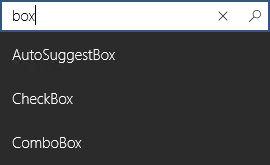
Я знаю, что это старый вопрос, но для новых поисковиков, таких как я, я нашел свойство ComboBox.IsEditable is fine
Я искал везде доступный для поиска Combobox и решил написать свой собственный. Он не совсем похож на ваш редактируемый combobox, но будет фильтровать параметры в combobox при вводе текста. Может быть, это кому-то поможет.
Вы бы определили новый элемент управления следующим образом:
<control:SearchableComboBox Margin='5'
          x:Name='ComboBoxCountry'
          ItemsSourceList='{Binding CountryList}'
          ItemsSourceListBase='{Binding CountryListBase}'
          PlaceholderText='Select Country'/>
К сожалению, вам все еще нужно предоставить дубликат списка, CountryListBase. Если у вас есть предложения по улучшению этого, дайте мне знать!
using System.Collections.Generic;
using System.Collections.ObjectModel;
using System.Linq;
using Windows.System;
using Windows.UI.Xaml;
using Windows.UI.Xaml.Controls;
using Windows.UI.Xaml.Input;

namespace eMoyoConnect.Controls
{
    public class SearchableComboBox : ComboBox
    {

        public ObservableCollection<string> ItemsSourceList
        {
            get { return (ObservableCollection<string>)GetValue(ItemsSourceListProperty); }
            set
            {
                SetValue(ItemsSourceListProperty, value);
                this.ItemsSource = ItemsSourceList;
            }
        }

        public static readonly DependencyProperty ItemsSourceListProperty =
            DependencyProperty.Register("ItemsSourceList", typeof(ObservableCollection<string>), typeof(SearchableComboBox),
            new PropertyMetadata(null, ItemsSourceListChanged));

        private static void ItemsSourceListChanged(DependencyObject d, DependencyPropertyChangedEventArgs e)
        {
            var plv = d as SearchableComboBox;
            plv.ItemsSource = e.NewValue;
        }

        public Collection<string> ItemsSourceListBase
        {
            get { return (Collection<string>)GetValue(ItemsSourceListBaseProperty); }
            set
            {
                SetValue(ItemsSourceListBaseProperty, value);
                this.ItemsSource = ItemsSourceListBase;
            }
        }

        public static readonly DependencyProperty ItemsSourceListBaseProperty =
            DependencyProperty.Register("ItemsSourceListBase", typeof(Collection<string>), typeof(SearchableComboBox),
            new PropertyMetadata(null, ItemsSourceListBaseChanged));

        private static void ItemsSourceListBaseChanged(DependencyObject d, DependencyPropertyChangedEventArgs e)
        {
            var plv = d as SearchableComboBox;
            plv.ItemsSource = e.NewValue;
        }

        string FilterString = "";
        protected override void OnKeyDown(KeyRoutedEventArgs e)
        {
            if (IsLetterOrSpace(e.Key))
            {
                if (e.Key == VirtualKey.Space)
                    FilterString += " ";
                else
                    FilterString += e.Key.ToString();
                FilterList(FilterString);
                this.ItemsSource = ItemsSourceList;
                if (ItemsSourceList.Count > 0)
                    this.SelectedIndex = 0;
            }
            else if (e.Key == VirtualKey.Back)
            {
                if (FilterString.Length > 0)
                {
                    FilterString = FilterString.Substring(0, FilterString.Length - 1);
                    FilterList(FilterString);
                    this.ItemsSource = ItemsSourceList;
                    if (ItemsSourceList.Count > 0)
                        this.SelectedIndex = 0;
                }
            }

            if (e.Key != VirtualKey.Space)
            {
                base.OnKeyDown(e);
            }
        }

        protected override void OnGotFocus(RoutedEventArgs e)
        {
            string selectedValue = "";
            if (this.SelectedValue != null)
                selectedValue = (string)this.SelectedValue;
            FilterString = "";
            FilterList(FilterString);
            if (!string.IsNullOrEmpty(selectedValue))
                this.SelectedValue = selectedValue;
        }

        internal void FilterList(string FilterString)
        {
            ItemsSourceList.Clear();
            IEnumerable<string> list;
            if (!string.IsNullOrEmpty(FilterString))
                list = ItemsSourceListBase.Where(x => x.StartsWith(FilterString));
            else
                list = ItemsSourceListBase;
            foreach (var item in list)
                ItemsSourceList.Add(item);
        }

        private bool IsLetterOrSpace(VirtualKey key)
        {
            return (key == VirtualKey.A
                || key == VirtualKey.B
                || key == VirtualKey.C
                || key == VirtualKey.D
                || key == VirtualKey.E
                || key == VirtualKey.F
                || key == VirtualKey.G
                || key == VirtualKey.H
                || key == VirtualKey.I
                || key == VirtualKey.J
                || key == VirtualKey.K
                || key == VirtualKey.L
                || key == VirtualKey.M
                || key == VirtualKey.N
                || key == VirtualKey.O
                || key == VirtualKey.P
                || key == VirtualKey.Q
                || key == VirtualKey.R
                || key == VirtualKey.S
                || key == VirtualKey.T
                || key == VirtualKey.U
                || key == VirtualKey.V
                || key == VirtualKey.W
                || key == VirtualKey.X
                || key == VirtualKey.Y
                || key == VirtualKey.Z
                || key == VirtualKey.Space);
        }
    }
}
Comments