7 ответов:
возможно, используйте кодовую точку Unicode для символа маркера в вашей строке?
С
myLabel.text = @"\u2022 This is a list item!";Swift 4
myLabel.text = "\u{2022} This is a list item!"
просто добавить
" • "даже я искал что-то вроде этого для моего
textView. Что я сделал, просто добавьте выше строку с моей строкой и передайте ее моемуtextView, то же самое можно сделать дляlabelsтакже.Я ответил на это для будущего зрителя.
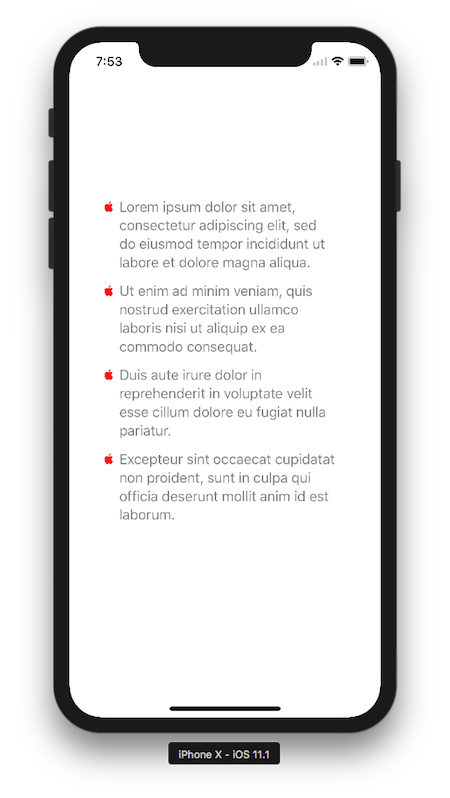
вот хорошее решение с Swift
let label = UILabel() label.frame = CGRect(x: 40, y: 100, width: 280, height: 600) label.textColor = UIColor.lightGray label.numberOfLines = 0 let arrayString = [ "Lorem ipsum dolor sit amet, consectetur adipiscing elit, sed do eiusmod tempor incididunt ut labore et dolore magna aliqua.", "Ut enim ad minim veniam, quis nostrud exercitation ullamco laboris nisi ut aliquip ex ea commodo consequat.", "Duis aute irure dolor in reprehenderit in voluptate velit esse cillum dolore eu fugiat nulla pariatur.", "Excepteur sint occaecat cupidatat non proident, sunt in culpa qui officia deserunt mollit anim id est laborum." ] label.attributedText = add(stringList: arrayString, font: label.font, bullet: "") self.view.addSubview(label)добавить атрибуты пуля
func add(stringList: [String],
         font: UIFont,
         bullet: String = "\u{2022}",
         indentation: CGFloat = 20,
         lineSpacing: CGFloat = 2,
         paragraphSpacing: CGFloat = 12,
         textColor: UIColor = .gray,
         bulletColor: UIColor = .red) -> NSAttributedString {

    let textAttributes: [NSAttributedStringKey: Any] = [NSAttributedStringKey.font: font, NSAttributedStringKey.foregroundColor: textColor]
    let bulletAttributes: [NSAttributedStringKey: Any] = [NSAttributedStringKey.font: font, NSAttributedStringKey.foregroundColor: bulletColor]

    let paragraphStyle = NSMutableParagraphStyle()
    let nonOptions = [NSTextTab.OptionKey: Any]()
    paragraphStyle.tabStops = [
        NSTextTab(textAlignment: .left, location: indentation, options: nonOptions)]
    paragraphStyle.defaultTabInterval = indentation
    //paragraphStyle.firstLineHeadIndent = 0
    //paragraphStyle.headIndent = 20
    //paragraphStyle.tailIndent = 1
    paragraphStyle.lineSpacing = lineSpacing
    paragraphStyle.paragraphSpacing = paragraphSpacing
    paragraphStyle.headIndent = indentation

    let bulletList = NSMutableAttributedString()
    for string in stringList {
        let formattedString = "\(bullet)\t\(string)\n"
        let attributedString = NSMutableAttributedString(string: formattedString)

        attributedString.addAttributes(
            [NSAttributedStringKey.paragraphStyle : paragraphStyle],
            range: NSMakeRange(0, attributedString.length))

        attributedString.addAttributes(
            textAttributes,
            range: NSMakeRange(0, attributedString.length))

        let string:NSString = NSString(string: formattedString)
        let rangeForBullet:NSRange = string.range(of: bullet)
        attributedString.addAttributes(bulletAttributes, range: rangeForBullet)
        bulletList.append(attributedString)
    }

    return bulletList
}
вот результаты:
In Swift 4 я использовал " • " с новой строки
 @IBOutlet weak var bulletLabel: UILabel!
 let arrayOfLines = ["Eat egg for protein","You should Eat Ghee","Wheat is with high fiber","Avoid to eat Fish "]
 for value in arrayOfLines {
     bulletLabel.text = bulletLabel.text!  + " • " + value + "\n"
  }
выход:

проверьте эту ссылку, я сделал пользовательский вид для форматирования текста с маркерами / другими символами / изображением(используя свойство attributeText UILabel) в качестве символа элемента списка (Swift 3.0) https://github.com/akshaykumarboth/SymbolTextLabel-iOS-Swift
 import UIKit

    class ViewController: UIViewController {

    @IBOutlet var symbolView: SymbolTextLabel!

    var testString = "Understanding the concept of sales"

    var bulletSymbol = "\u{2022}"
    var fontsize: CGFloat= 18
    override func viewDidLoad() {

        super.viewDidLoad()
         //First way // Dynamically creating SymbolTextLabel object

        let symbolTextLabel = SymbolTextLabel(frame: CGRect(x: 0, y: 0, width: 0, height: 0))

        symbolTextLabel.setText(text: testString, symbolCode: bulletSymbol) //setting text and symbol of text item

        symbolTextLabel.setFontSize(textSize: fontsize) // setting font size

        //symbolTextLabel.setSpacing(spacing: 5) // setting space between symbol and text

        self.view.addSubview(symbolTextLabel)
//second way // from storyboard or interface builder

     symbolView.setText(text: testString, symbolCode: bulletSymbol)
 //setting text and symbol of text item

    symbolView.setFontSize(textSize: fontsize) // setting font size

        //symbolView.setSpacing(spacing: 5) // setting space between symbol and text

         }
    }
если вы хотите выровнять отступ текста для маркированных точек, а также, вы можете использовать следующий метод, который строит
NSAttributedStringс соответствующими свойствами отступа и интервала:- (NSAttributedString *)attributedStringForBulletTexts:(NSArray *)stringList withFont:(UIFont *)font bulletString:(NSString *)bullet indentation:(CGFloat)indentation lineSpacing:(CGFloat)lineSpacing paragraphSpacing:(CGFloat)paragraphSpacing textColor:(UIColor *)textColor bulletColor:(UIColor *)bulletColor { NSDictionary *textAttributes = @{NSFontAttributeName: font, NSForegroundColorAttributeName: textColor}; NSDictionary *bulletAttributes = @{NSFontAttributeName: font, NSForegroundColorAttributeName: bulletColor}; NSMutableParagraphStyle *paragraphStyle = [NSMutableParagraphStyle new]; paragraphStyle.tabStops = @[[[NSTextTab alloc] initWithTextAlignment: NSTextAlignmentLeft location:indentation options:@{}]]; paragraphStyle.defaultTabInterval = indentation; paragraphStyle.lineSpacing = lineSpacing; paragraphStyle.paragraphSpacing = paragraphSpacing; paragraphStyle.headIndent = indentation; NSMutableAttributedString *bulletList = [NSMutableAttributedString new]; for (NSString *string in stringList) { NSString *formattedString = [NSString stringWithFormat:@"%@\t%@\n", bullet, string]; NSMutableAttributedString *attributedString = [[NSMutableAttributedString alloc] initWithString:formattedString]; if (string == stringList.lastObject) { paragraphStyle = [paragraphStyle mutableCopy]; paragraphStyle.paragraphSpacing = 0; } [attributedString addAttributes:@{NSParagraphStyleAttributeName: paragraphStyle} range:NSMakeRange(0, attributedString.length)]; [attributedString addAttributes:textAttributes range:NSMakeRange(0, attributedString.length)]; NSRange rangeForBullet = [formattedString rangeOfString:bullet]; [attributedString addAttributes:bulletAttributes range:rangeForBullet]; [bulletList appendAttributedString:attributedString]; } return bulletList; }и вы можете использовать этот метод следующим образом, путем передачи
NSArrayс текстами и при условии, что у вас уже естьUILabel:NSArray *stringArray = @[@"Lorem ipsum dolor sit amet, consectetur adipiscing elit, sed do eiusmod tempor incididunt ut labore et dolore magna aliqua.", @"Ut enim ad minim veniam, quis nostrud exercitation ullamco laboris nisi ut aliquip ex ea commodo consequat.", @"Duis aute irure dolor in reprehenderit in voluptate velit esse cillum dolore eu fugiat nulla pariatur.", @"Excepteur sint occaecat cupidatat non proident, sunt in culpa qui officia deserunt mollit anim id est laborum." ]; label.attributedText = [self attributedStringForBulletTexts:stringArray withFont:label.font bulletString:@"•" indentation:15 lineSpacing:2 paragraphSpacing:10 textColor:UIColor.blackColor bulletColor:UIColor.grayColor];
Comments