Как проверить, включены ли Службы определения местоположения?
Я разрабатываю приложение на Android OS. Я не знаю, как проверить, включены ли Службы определения местоположения или нет.
Мне нужен метод, который возвращает "true", если они включены, и" false", если нет (поэтому в последнем случае я могу показать диалог, чтобы включить их).
16 ответов:
вы можете использовать приведенный ниже код, чтобы проверить, включен ли поставщик gps и сетевые провайдеры.
LocationManager lm = (LocationManager)context.getSystemService(Context.LOCATION_SERVICE);
boolean gps_enabled = false;
boolean network_enabled = false;

try {
    gps_enabled = lm.isProviderEnabled(LocationManager.GPS_PROVIDER);
} catch(Exception ex) {}

try {
    network_enabled = lm.isProviderEnabled(LocationManager.NETWORK_PROVIDER);
} catch(Exception ex) {}

if(!gps_enabled && !network_enabled) {
    // notify user
    AlertDialog.Builder dialog = new AlertDialog.Builder(context);
    dialog.setMessage(context.getResources().getString(R.string.gps_network_not_enabled));
    dialog.setPositiveButton(context.getResources().getString(R.string.open_location_settings), new DialogInterface.OnClickListener() {
            @Override
            public void onClick(DialogInterface paramDialogInterface, int paramInt) {
                // TODO Auto-generated method stub
                Intent myIntent = new Intent( Settings.ACTION_LOCATION_SOURCE_SETTINGS);
                context.startActivity(myIntent);
                //get gps
            }
        });
    dialog.setNegativeButton(context.getString(R.string.Cancel), new DialogInterface.OnClickListener() {

            @Override
            public void onClick(DialogInterface paramDialogInterface, int paramInt) {
                // TODO Auto-generated method stub

            }
        });
    dialog.show();
}
и в файле манифеста вам нужно будет добавить следующие разрешения
<uses-permission android:name="android.permission.ACCESS_FINE_LOCATION"/>
<uses-permission android:name="android.permission.ACCESS_COARSE_LOCATION"/>
Я использую этот код для проверки:
public static boolean isLocationEnabled(Context context) {
    int locationMode = 0;
    String locationProviders;

    if (Build.VERSION.SDK_INT >= Build.VERSION_CODES.KITKAT){
        try {
            locationMode = Settings.Secure.getInt(context.getContentResolver(), Settings.Secure.LOCATION_MODE);

        } catch (SettingNotFoundException e) {
            e.printStackTrace();
            return false;
        }

        return locationMode != Settings.Secure.LOCATION_MODE_OFF;

    }else{
        locationProviders = Settings.Secure.getString(context.getContentResolver(), Settings.Secure.LOCATION_PROVIDERS_ALLOWED);
        return !TextUtils.isEmpty(locationProviders);
    }


}
вы можете использовать этот код для направления пользователей в Настройки, где они могут включить GPS:
    locationManager = (LocationManager) context.getSystemService(Context.LOCATION_SERVICE);
    if( !locationManager.isProviderEnabled(LocationManager.GPS_PROVIDER) ) {
        AlertDialog.Builder builder = new AlertDialog.Builder(context);
        builder.setTitle(R.string.gps_not_found_title);  // GPS not found
        builder.setMessage(R.string.gps_not_found_message); // Want to enable?
        builder.setPositiveButton(R.string.yes, new DialogInterface.OnClickListener() {
            public void onClick(DialogInterface dialogInterface, int i) {
                owner.startActivity(new Intent(android.provider.Settings.ACTION_LOCATION_SOURCE_SETTINGS));
            }
        });
        builder.setNegativeButton(R.string.no, null);
        builder.create().show();
        return;
    }
отрабатывая ответ выше, в API 23 вам нужно добавить" опасные " проверки разрешений, а также проверить саму систему:
public static boolean isLocationServicesAvailable(Context context) {
    int locationMode = 0;
    String locationProviders;
    boolean isAvailable = false;

    if (Build.VERSION.SDK_INT >= Build.VERSION_CODES.KITKAT){
        try {
            locationMode = Settings.Secure.getInt(context.getContentResolver(), Settings.Secure.LOCATION_MODE);
        } catch (Settings.SettingNotFoundException e) {
            e.printStackTrace();
        }

        isAvailable = (locationMode != Settings.Secure.LOCATION_MODE_OFF);
    } else {
        locationProviders = Settings.Secure.getString(context.getContentResolver(), Settings.Secure.LOCATION_PROVIDERS_ALLOWED);
        isAvailable = !TextUtils.isEmpty(locationProviders);
    }

    boolean coarsePermissionCheck = (ContextCompat.checkSelfPermission(context, Manifest.permission.ACCESS_COARSE_LOCATION) == PackageManager.PERMISSION_GRANTED);
    boolean finePermissionCheck = (ContextCompat.checkSelfPermission(context, Manifest.permission.ACCESS_FINE_LOCATION) == PackageManager.PERMISSION_GRANTED);

    return isAvailable && (coarsePermissionCheck || finePermissionCheck);
}
Да, вы можете увидеть ниже код:
public boolean isGPSEnabled(Context mContext)
{
    LocationManager lm = (LocationManager)
    mContext.getSystemService(Context.LOCATION_SERVICE);
    return lm.isProviderEnabled(LocationManager.GPS_PROVIDER);
}
с разрешением в файле манифеста:
<uses-permission android:name="android.permission.ACCESS_FINE_LOCATION" />
Если ни один поставщик не включен, "пассивный" является лучшим поставщиком возвращается. См.https://stackoverflow.com/a/4519414/621690
    public boolean isLocationServiceEnabled() {
        LocationManager lm = (LocationManager)
                this.getSystemService(Context.LOCATION_SERVICE);
        String provider = lm.getBestProvider(new Criteria(), true);
        return (StringUtils.isNotBlank(provider) &&
                !LocationManager.PASSIVE_PROVIDER.equals(provider));
    }
это предложение if легко проверяет, доступны ли службы определения местоположения на мой взгляд:
LocationManager locationManager = (LocationManager) getSystemService(Context.LOCATION_SERVICE);
if(!locationManager.isProviderEnabled(LocationManager.GPS_PROVIDER) && !locationManager.isProviderEnabled(LocationManager.NETWORK_PROVIDER)) {
        //All location services are disabled

}
Как указал Питер Маккленнан, у Google есть API, который очень хорошо работает с новым поставщиком Fused location. Полностью проработанный пример находится на пример кода Google на Github вам не нужно кодировать диалоговое окно пользователя, чтобы попросить их изменить настройки, как это делается автоматически с помощью API.
Я использую такой способ для сервис network_provider но вы можете добавить и GPS.
LocationManager locationManager;на onCreate я поставил
   isLocationEnabled();
   if(!isLocationEnabled()) {
        AlertDialog.Builder builder = new AlertDialog.Builder(MainActivity.this);
        builder.setTitle(R.string.network_not_enabled)
                .setMessage(R.string.open_location_settings)
                .setPositiveButton(R.string.yes,
                        new DialogInterface.OnClickListener() {
                            public void onClick(DialogInterface dialog, int id) {
                                startActivity(new Intent(Settings.ACTION_LOCATION_SOURCE_SETTINGS));
                            }
                        })
                .setNegativeButton(R.string.cancel,
                        new DialogInterface.OnClickListener() {
                            public void onClick(DialogInterface dialog, int id) {
                                dialog.cancel();
                            }
                        });
        AlertDialog alert = builder.create();
        alert.show();
    }
и метод проверки
protected boolean isLocationEnabled(){
    String le = Context.LOCATION_SERVICE;
    locationManager = (LocationManager) getSystemService(le);
    if(!locationManager.isProviderEnabled(LocationManager.NETWORK_PROVIDER)){
        return false;
    } else {
        return true;
    }
}
Это очень полезный метод, который возвращает "
true" еслиLocation servicesвключены:public static boolean locationServicesEnabled(Context context) { LocationManager lm = (LocationManager) context.getSystemService(Context.LOCATION_SERVICE); boolean gps_enabled = false; boolean net_enabled = false; try { gps_enabled = lm.isProviderEnabled(LocationManager.GPS_PROVIDER); } catch (Exception ex) { Log.e(TAG,"Exception gps_enabled"); } try { net_enabled = lm.isProviderEnabled(LocationManager.NETWORK_PROVIDER); } catch (Exception ex) { Log.e(TAG,"Exception network_enabled"); } return gps_enabled || net_enabled; }
и текущая Гео расположение в Android Google maps, вы должен включить местоположение вашего устройства option.To проверьте, включено ли местоположение или нет,вы можете просто вызвать этот метод из вашего
onCreate()метод.private void checkGPSStatus() { LocationManager locationManager = null; boolean gps_enabled = false; boolean network_enabled = false; if ( locationManager == null ) { locationManager = (LocationManager) getSystemService(Context.LOCATION_SERVICE); } try { gps_enabled = locationManager.isProviderEnabled(LocationManager.GPS_PROVIDER); } catch (Exception ex){} try { network_enabled = locationManager.isProviderEnabled(LocationManager.NETWORK_PROVIDER); } catch (Exception ex){} if ( !gps_enabled && !network_enabled ){ AlertDialog.Builder dialog = new AlertDialog.Builder(MyActivity.this); dialog.setMessage("GPS not enabled"); dialog.setPositiveButton("Ok", new DialogInterface.OnClickListener() { @Override public void onClick(DialogInterface dialog, int which) { //this will navigate user to the device location settings screen Intent intent = new Intent(Settings.ACTION_LOCATION_SOURCE_SETTINGS); startActivity(intent); } }); AlertDialog alert = dialog.create(); alert.show(); } }
вы можете запросить обновления местоположения и показать диалог вместе, как GoogleMaps doas также. Вот код:
googleApiClient = new GoogleApiClient.Builder(getActivity())
                .addApi(LocationServices.API)
                .addConnectionCallbacks(this)
                .addOnConnectionFailedListener(this).build();
googleApiClient.connect();

LocationRequest locationRequest = LocationRequest.create();
locationRequest.setPriority(LocationRequest.PRIORITY_HIGH_ACCURACY);
locationRequest.setInterval(30 * 1000);
locationRequest.setFastestInterval(5 * 1000);
LocationSettingsRequest.Builder builder = new LocationSettingsRequest.Builder()
                    .addLocationRequest(locationRequest);

builder.setAlwaysShow(true); //this is the key ingredient

PendingResult<LocationSettingsResult> result = LocationServices.SettingsApi.checkLocationSettings(googleApiClient, builder.build());
result.setResultCallback(new ResultCallback<LocationSettingsResult>() {
    @Override
    public void onResult(LocationSettingsResult result) {
        final Status status = result.getStatus();
        final LocationSettingsStates state = result.getLocationSettingsStates();
        switch (status.getStatusCode()) {
            case LocationSettingsStatusCodes.SUCCESS:
                // All location settings are satisfied. The client can initialize location
                // requests here.
                break;
            case LocationSettingsStatusCodes.RESOLUTION_REQUIRED:
                // Location settings are not satisfied. But could be fixed by showing the user
                // a dialog.
                try {
                    // Show the dialog by calling startResolutionForResult(),
                    // and check the result in onActivityResult().
                    status.startResolutionForResult(getActivity(), 1000);
                } catch (IntentSender.SendIntentException ignored) {}
                break;
            case LocationSettingsStatusCodes.SETTINGS_CHANGE_UNAVAILABLE:
                // Location settings are not satisfied. However, we have no way to fix the
                // settings so we won't show the dialog.
                break;
            }
        }
    });
}
Если вам нужна дополнительная информация, регистрация LocationRequest класса.
для Котлин
 private fun isLocationEnabled(mContext: Context): Boolean {
    val lm = mContext.getSystemService(Context.LOCATION_SERVICE) as LocationManager
    return lm.isProviderEnabled(LocationManager.GPS_PROVIDER) || lm.isProviderEnabled(
            LocationManager.NETWORK_PROVIDER)
 }
чтобы проверить поставщика сети, вам просто нужно изменить строку, переданную isProviderEnabled в LocationManager.NETWORK_PROVIDER если вы проверяете возвращаемые значения как для провайдера GPS, так и для провайдера Сети - оба false означает отсутствие служб определения местоположения
private boolean isGpsEnabled()
{
    LocationManager service = (LocationManager) getSystemService(LOCATION_SERVICE);
    return service.isProviderEnabled(LocationManager.GPS_PROVIDER)&&service.isProviderEnabled(LocationManager.NETWORK_PROVIDER);
}
Я использую первый код начать создавать метод isLocationEnabled
 private LocationManager locationManager ;

protected boolean isLocationEnabled(){
        String le = Context.LOCATION_SERVICE;
        locationManager = (LocationManager) getSystemService(le);
        if(!locationManager.isProviderEnabled(LocationManager.NETWORK_PROVIDER)){
            return false;
        } else {
            return true;
        }
    }
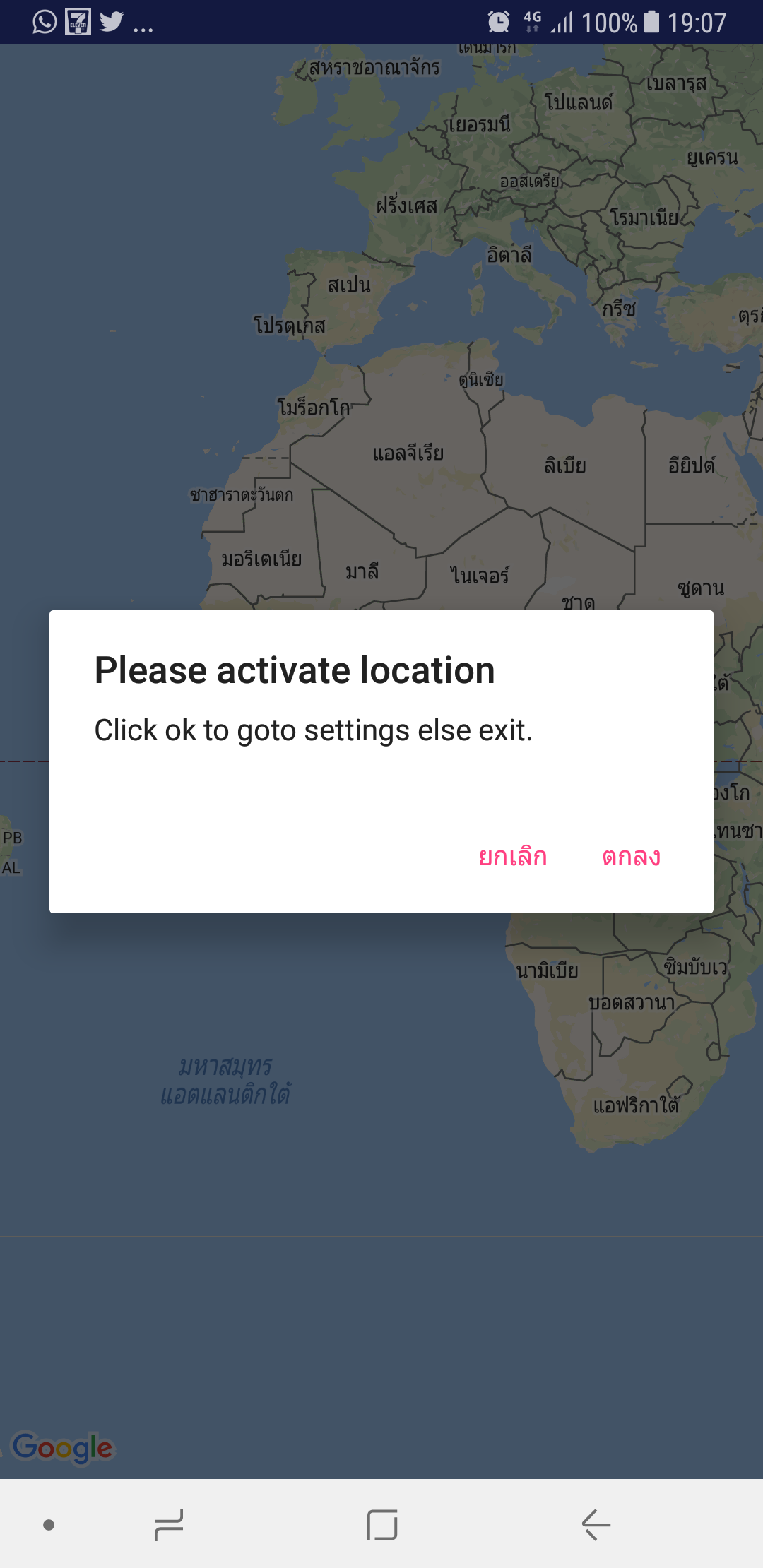
и я проверяю условие, если туре открывает карту и ложь дает намерение ACTION_LOCATION_SOURCE_SETTINGS
    if (isLocationEnabled()) {
        SupportMapFragment mapFragment = (SupportMapFragment) getSupportFragmentManager()
                .findFragmentById(R.id.map);
        mapFragment.getMapAsync(this);

        locationClient = getFusedLocationProviderClient(this);
        locationClient.getLastLocation()
                .addOnSuccessListener(new OnSuccessListener<Location>() {
                    @Override
                    public void onSuccess(Location location) {
                        // GPS location can be null if GPS is switched off
                        if (location != null) {
                            onLocationChanged(location);

                            Log.e("location", String.valueOf(location.getLongitude()));
                        }
                    }
                })
                .addOnFailureListener(new OnFailureListener() {
                    @Override
                    public void onFailure(@NonNull Exception e) {
                        Log.e("MapDemoActivity", e.toString());
                        e.printStackTrace();
                    }
                });


        startLocationUpdates();

    }
    else {
        new AlertDialog.Builder(this)
                .setTitle("Please activate location")
                .setMessage("Click ok to goto settings else exit.")
                .setPositiveButton(android.R.string.yes, new DialogInterface.OnClickListener() {
                    public void onClick(DialogInterface dialog, int which) {
                        Intent intent = new Intent(Settings.ACTION_LOCATION_SOURCE_SETTINGS);
                        startActivity(intent);
                    }
                })
                .setNegativeButton(android.R.string.no, new DialogInterface.OnClickListener() {
                    public void onClick(DialogInterface dialog, int which) {
                        System.exit(0);
                    }
                })
                .show();
    }
Comments