Как использовать ScrollView в Android?
у меня есть XML-файл макета, но текст больше, чем вписывается в размер экрана. Что мне нужно сделать, чтобы сделать ScrollView?
<?xml version="1.0" encoding="utf-8"?>


<TableLayout xmlns:android="http://schemas.android.com/apk/res/android"

    android:layout_width="fill_parent"

    android:layout_height="fill_parent"

    android:stretchColumns="1" >


    <TableRow>

        <ImageView

            android:id="@+id/imageView"

            android:layout_width="wrap_content"

            android:layout_height="wrap_content"

            android:layout_marginLeft="5dip"

            android:layout_marginTop="10dip"

            android:layout_marginRight="5dip"

            android:tint="#55ff0000"

            android:src="@drawable/icon" />

    </TableRow>

    <TableRow>

        <TextView

            android:id="@+id/name"

            android:layout_width="wrap_content"

            android:layout_height="wrap_content"

            android:padding="3dip"

            android:text="  Name " />

        <TextView android:id="@+id/name1"

            android:layout_width="wrap_content"

            android:layout_height="wrap_content"

            android:gravity="left"

            android:text="Veer" />

    </TableRow>

    <TableRow>

        <TextView android:id="@+id/age"

            android:layout_width="wrap_content"

            android:layout_height="wrap_content"

            android:padding="3dip"

            android:text="  Age" />


        <TextView android:id="@+id/age1"

            android:layout_width="wrap_content"

            android:layout_height="wrap_content"

            android:gravity="left"

            android:text="23" />

    </TableRow>

    <TableRow>

        <TextView android:id="@+id/gender"

            android:layout_width="wrap_content"

            android:layout_height="wrap_content"

            android:padding="3dip"

            android:text="  Gender" />

        <TextView android:id="@+id/gender1"

            android:layout_width="wrap_content"

            android:layout_height="wrap_content"

            android:gravity="left"

            android:text="Male" />

    </TableRow>

    <TableRow>

        <TextView android:id="@+id/profession"

            android:layout_width="wrap_content"

            android:layout_height="wrap_content"

            android:padding="3dip"

            android:text="  Professsion" />

        <TextView android:id="@+id/profession1"

            android:layout_width="wrap_content"

            android:layout_height="wrap_content"

            android:gravity="left"

            android:text="Mobile Developer" />

    </TableRow>

    <TableRow>

        <TextView android:id="@+id/phone"

            android:layout_width="wrap_content"

            android:layout_height="wrap_content"

            android:padding="3dip"

            android:text="  Phone" />

        <TextView android:id="@+id/phone1"

            android:layout_width="wrap_content"

            android:layout_height="wrap_content"

            android:gravity="left"

            android:text="03333736767" />

    </TableRow>

    <TableRow>

        <TextView android:id="@+id/email"

            android:layout_width="wrap_content"

            android:layout_height="wrap_content"

            android:padding="3dip"

            android:text="  Email" />

        <TextView android:id="@+id/email1"

            android:layout_width="wrap_content"

            android:layout_height="wrap_content"

            android:gravity="left"

            android:text="[email protected]" />

    </TableRow>

    <TableRow>

        <TextView android:id="@+id/hobby"

            android:layout_width="wrap_content"

            android:layout_height="wrap_content"

            android:padding="3dip"

            android:text="  Hobby" />

        <TextView android:id="@+id/hobby1"

            android:layout_width="wrap_content"

            android:layout_height="wrap_content"

            android:gravity="left"

            android:text="Play Games" />

    </TableRow>

    <TableRow>

        <TextView android:id="@+id/ilike"

            android:layout_width="wrap_content"

            android:layout_height="wrap_content"

            android:padding="3dip"

            android:text="  I like" />

        <TextView android:id="@+id/ilike1"

            android:layout_width="wrap_content"

            android:layout_height="wrap_content"

            android:gravity="left"

            android:text="Java, Objective-c" />

    </TableRow>

    <TableRow>

        <TextView android:id="@+id/idislike"

            android:layout_width="wrap_content"

            android:layout_height="wrap_content"

            android:padding="3dip"

            android:text="  I dislike" />

        <TextView android:id="@+id/idislike1"

            android:layout_width="wrap_content"

            android:layout_height="wrap_content"

            android:gravity="left"

            android:text="Microsoft" />

    </TableRow>

    <TableRow>

        <TextView android:id="@+id/address"

            android:layout_width="wrap_content"

            android:layout_height="wrap_content"

            android:padding="3dip"

            android:text="  Address" />

        <TextView android:id="@+id/address1"

            android:layout_width="wrap_content"

            android:layout_height="wrap_content"

            android:gravity="left"

            android:text="Johar Mor" />

    </TableRow>

</TableLayout>
8 ответов:
просто сделайте макет верхнего уровня ScrollView:
<ScrollView xmlns:android="http://schemas.android.com/apk/res/android"
    android:layout_width="match_parent"
    android:layout_height="match_parent"
    android:fillViewport="true">

    <TableLayout
        android:layout_width="match_parent"
        android:layout_height="match_parent"
        android:stretchColumns="1">

        <!-- everything you already have -->

    </TableLayout>
</ScrollView>
есть два варианта. Вы можете сделать весь макет прокручиваемым или прокручивать только текстовое представление.
в первом случае
<?xml version="1.0" encoding="utf-8"?>
<ScrollView xmlns:android="http://schemas.android.com/apk/res/android"
    android:layout_width="fill_parent"
    android:layout_height="fill_parent" >

    <RelativeLayout
        android:layout_width="fill_parent"
        android:layout_height="fill_parent" >

        <TableLayout
            android:layout_width="fill_parent"
            android:layout_height="fill_parent"
            android:stretchColumns="1" >

            <TableRow>

                <ImageView
                    android:id="@+id/imageView"
                    android:layout_width="wrap_content"
                    android:layout_height="wrap_content"
                    android:layout_marginLeft="5dip"
                    android:layout_marginRight="5dip"
                    android:layout_marginTop="10dip"
                    android:src="@drawable/icon"
                    android:tint="#55ff0000" >
                </ImageView>
            </TableRow>

            <TableRow>

                <TextView
                    android:id="@+id/name"
                    android:layout_width="wrap_content"
                    android:layout_height="wrap_content"
                    android:padding="3dip"
                    android:text="  Name " >
                </TextView>

                <TextView
                    android:id="@+id/name1"
                    android:layout_width="wrap_content"
                    android:layout_height="wrap_content"
                    android:gravity="left"
                    android:text="Veer" >
                </TextView>
            </TableRow>

            <TableRow>

                <TextView
                    android:id="@+id/age"
                    android:layout_width="wrap_content"
                    android:layout_height="wrap_content"
                    android:padding="3dip"
                    android:text="  Age" >
                </TextView>

                <TextView
                    android:id="@+id/age1"
                    android:layout_width="wrap_content"
                    android:layout_height="wrap_content"
                    android:gravity="left"
                    android:text="23" >
                </TextView>
            </TableRow>

            <TableRow>

                <TextView
                    android:id="@+id/gender"
                    android:layout_width="wrap_content"
                    android:layout_height="wrap_content"
                    android:padding="3dip"
                    android:text="  Gender" >
                </TextView>

                <TextView
                    android:id="@+id/gender1"
                    android:layout_width="wrap_content"
                    android:layout_height="wrap_content"
                    android:gravity="left"
                    android:text="Male" >
                </TextView>
            </TableRow>

            <TableRow>

                <TextView
                    android:id="@+id/profession"
                    android:layout_width="wrap_content"
                    android:layout_height="wrap_content"
                    android:padding="3dip"
                    android:text="  Professsion" >
                </TextView>

                <TextView
                    android:id="@+id/profession1"
                    android:layout_width="wrap_content"
                    android:layout_height="wrap_content"
                    android:gravity="left"
                    android:text="Mobile Developer" >
                </TextView>
            </TableRow>

            <TableRow>

                <TextView
                    android:id="@+id/phone"
                    android:layout_width="wrap_content"
                    android:layout_height="wrap_content"
                    android:padding="3dip"
                    android:text="  Phone" >
                </TextView>

                <TextView
                    android:id="@+id/phone1"
                    android:layout_width="wrap_content"
                    android:layout_height="wrap_content"
                    android:gravity="left"
                    android:text="03333736767" >
                </TextView>
            </TableRow>

            <TableRow>

                <TextView
                    android:id="@+id/email"
                    android:layout_width="wrap_content"
                    android:layout_height="wrap_content"
                    android:padding="3dip"
                    android:text="  Email" >
                </TextView>

                <TextView
                    android:id="@+id/email1"
                    android:layout_width="wrap_content"
                    android:layout_height="wrap_content"
                    android:gravity="left"
                    android:text="[email protected]" >
                </TextView>
            </TableRow>

            <TableRow>

                <TextView
                    android:id="@+id/hobby"
                    android:layout_width="wrap_content"
                    android:layout_height="wrap_content"
                    android:padding="3dip"
                    android:text="  Hobby" >
                </TextView>

                <TextView
                    android:id="@+id/hobby1"
                    android:layout_width="wrap_content"
                    android:layout_height="wrap_content"
                    android:gravity="left"
                    android:text="Play Games" >
                </TextView>
            </TableRow>

            <TableRow>

                <TextView
                    android:id="@+id/ilike"
                    android:layout_width="wrap_content"
                    android:layout_height="wrap_content"
                    android:padding="3dip"
                    android:text="  I like" >
                </TextView>

                <TextView
                    android:id="@+id/ilike1"
                    android:layout_width="wrap_content"
                    android:layout_height="wrap_content"
                    android:gravity="left"
                    android:text="Java, Objective-c" >
                </TextView>
            </TableRow>

            <TableRow>

                <TextView
                    android:id="@+id/idislike"
                    android:layout_width="wrap_content"
                    android:layout_height="wrap_content"
                    android:padding="3dip"
                    android:text="  I dislike" >
                </TextView>

                <TextView
                    android:id="@+id/idislike1"
                    android:layout_width="wrap_content"
                    android:layout_height="wrap_content"
                    android:gravity="left"
                    android:text="Microsoft" >
                </TextView>
            </TableRow>

            <TableRow>

                <TextView
                    android:id="@+id/address"
                    android:layout_width="wrap_content"
                    android:layout_height="wrap_content"
                    android:padding="3dip"
                    android:text="  Address" >
                </TextView>

                <TextView
                    android:id="@+id/address1"
                    android:layout_width="wrap_content"
                    android:layout_height="wrap_content"
                    android:gravity="left"
                    android:text="Johar Mor" >
                </TextView>
            </TableRow>

            <Relativelayout>
            </Relativelayout>
        </TableLayout>
    </RelativeLayout>

</ScrollView>
или, как я уже сказал, Вы можете использовать scrollView только для TextView.
A ScrollView - это особый тип FrameLayout в том, что он позволяет пользователям прокручивать список представлений, которые занимают больше места, чем физический дисплей.Я просто добавляю некоторые атрибуты .
<ScrollView xmlns:android="http://schemas.android.com/apk/res/android"
     android:layout_width="fill_parent"
     android:layout_height="fill_parent"
     android:fillViewport="true"
     android:scrollbars = "vertical"
     android:scrollbarStyle="insideInset"
    >
    <TableLayout
        android:layout_width="fill_parent"
        android:layout_height="fill_parent"
        android:stretchColumns="1"
        >
        <!-- Add here which you want -->
    </TableLayout>

</ScrollView>
как использовать ScrollView
используя
ScrollViewне очень сложно. Вы можете просто добавить его в свой макет и поместить все, что вы хотите прокрутить внутри.ScrollViewтолько один ребенок, так что если вы хотите положить несколько вещей внутри, то вы должны сделать первое, что будет что-то вродеLinearLayout.<ScrollView android:layout_width="match_parent" android:layout_height="match_parent"> <LinearLayout android:layout_width="match_parent" android:layout_height="wrap_content" android:orientation="vertical"> <!-- things to scroll --> </LinearLayout> </ScrollView>если вы хотите прокручивать вещи по горизонтали, то используйте
HorizontalScrollView.заполнение содержимого экран
как говорится в этот пост, иногда вы хотите, чтобы
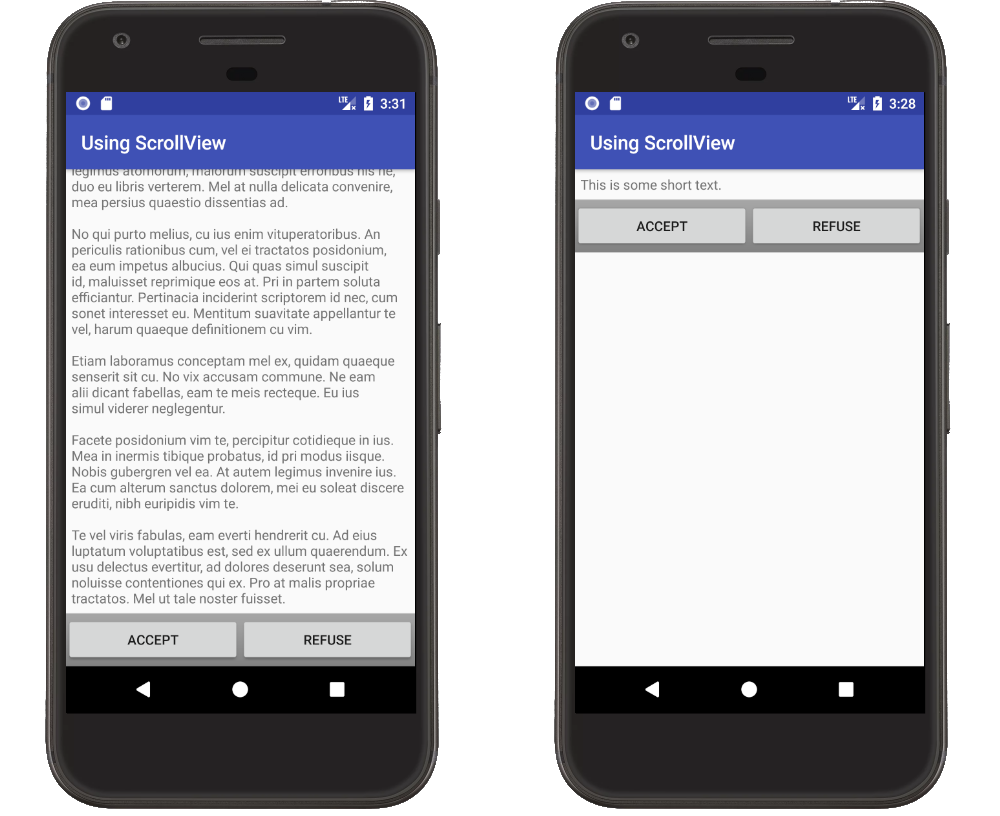
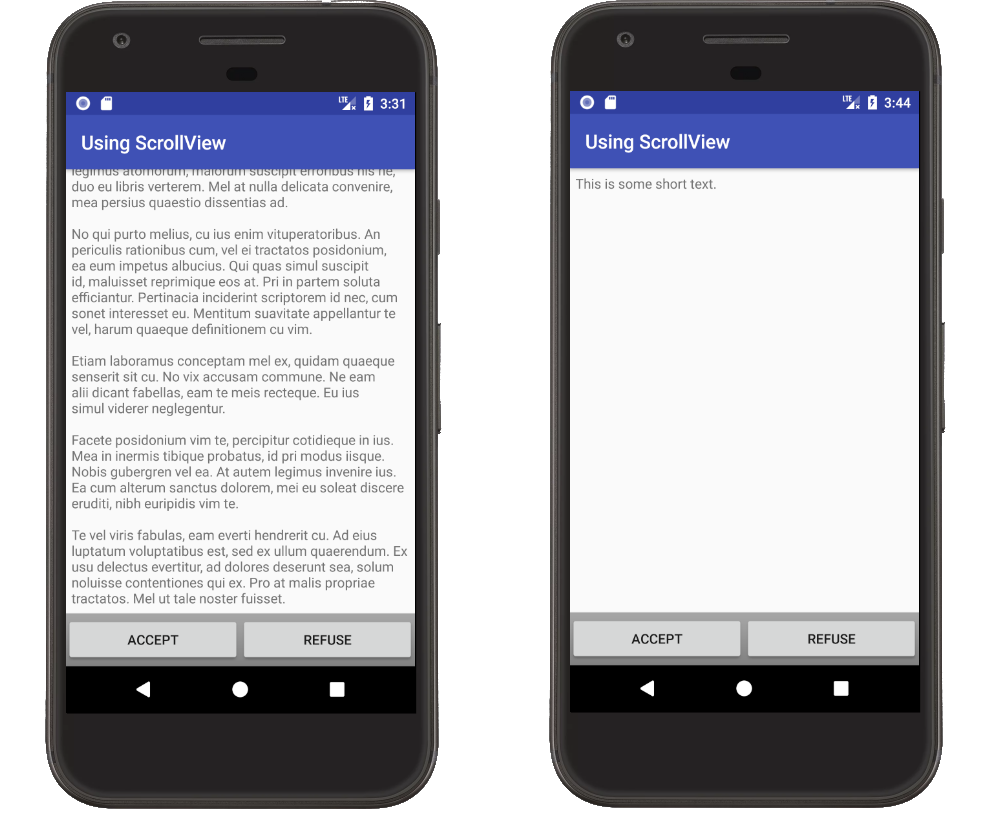
ScrollViewсодержимое для заполнения экрана. Например, если у вас есть несколько кнопок в конце readme. Хотите, чтобы кнопки всегда быть в конце текста и в нижней части экрана, даже если текст не прокручивается.если содержимое прокручивается, все в порядке. Однако, если содержание меньше, чем размер экрана, кнопки не в дно.
это можно решить с помощью комбинации использования
fillViewPortнаScrollViewи с помощью веса макета на содержание. ИспользуяfillViewPortделаетScrollViewзаполните родительскую область. Установкаlayout_weightна одном из представлений вLinearLayoutделает этот вид расширить, чтобы заполнить любое дополнительное пространство.
вот XML
<?xml version="1.0" encoding="utf-8"?>
<ScrollView
    xmlns:android="http://schemas.android.com/apk/res/android"
    android:layout_width="match_parent"
    android:layout_height="match_parent"
    android:fillViewport="true">                        <--- fillViewport

    <LinearLayout
        android:layout_width="match_parent"
        android:layout_height="wrap_content"
        android:orientation="vertical">

        <TextView
            android:id="@+id/textview"
            android:layout_height="0dp"                <---
            android:layout_weight="1"                  <--- set layout_weight
            android:layout_width="match_parent"
            android:padding="6dp"
            android:text="hello"/>

        <LinearLayout
            android:layout_height="wrap_content"       <--- wrap_content
            android:layout_width="match_parent"
            android:background="@android:drawable/bottom_bar"
            android:gravity="center_vertical">

            <Button
                android:layout_width="0dp"
                android:layout_weight="1"
                android:layout_height="wrap_content"
                android:text="Accept" />

            <Button
                android:layout_width="0dp"
                android:layout_weight="1"
                android:layout_height="wrap_content"
                android:text="Refuse" />

        </LinearLayout>
    </LinearLayout>
</ScrollView>
идея для этого ответа пришел из предыдущего ответа, который теперь удален (ссылка для пользователей 10K). Содержание этого ответа является обновлением и адаптацией этот пост.
как сказано выше, вы можете положить его внутри
ScrollView... и если вы хотите, чтобы вид прокрутки был горизонтальным, поместите его внутрьHorizontalScrollView... и если вы хотите, чтобы ваш компонент (или макет) поддерживал оба, поместите их в оба следующим образом:<HorizontalScrollView> <ScrollView> <!-- SOME THING --> </ScrollView> </HorizontalScrollView>и с
layout_widthиlayout_heightконечно.
для прокрутки данных в текстовом представлении вы можете использовать это в своем текстовом представлении. и добавить и для любого другого макета вы можете просто добавить вид прокрутки на макет, как люди говорят выше.
/** android: scrollable=true в textview в XML-макете.
TextView txtScroll = (TextView) findViewById(R.id.txt1);
        txtScroll.setMovementMethod(new ScrollingMovementMethod());
*//
<?xml version="1.0" encoding="utf-8"?>
<ScrollView xmlns:android="http://schemas.android.com/apk/res/android"

android:layout_width="fill_parent"
    android:layout_height="fill_parent" >

    <TableLayout
        android:layout_width="fill_parent"
        android:layout_height="fill_parent"
        android:stretchColumns="1" >

        <TableRow
            android:id="@+id/tableRow1"
            android:layout_width="wrap_content"
            android:layout_height="wrap_content" >

            <RadioGroup
                android:layout_width="fill_parent"
                android:layout_height="match_parent" >

                <RadioButton
                    android:id="@+id/butonSecim1"
                    android:layout_width="match_parent"
                    android:layout_height="match_parent"
                    android:layout_gravity="center"
                    android:layout_weight=".50"
                    android:text="@string/buton1Text" />

                <RadioButton
                    android:id="@+id/butonSecim2"
                    android:layout_width="match_parent"
                    android:layout_height="match_parent"
                    android:layout_gravity="center"
                    android:layout_weight=".50"
                    android:text="@string/buton2Text" />
            </RadioGroup>
        </TableRow>

        <TableRow
            android:id="@+id/tableRow2"
            android:layout_width="wrap_content"
            android:layout_height="wrap_content" >

            <TableLayout
                android:id="@+id/bilgiAlani"
                android:layout_width="fill_parent"
                android:layout_height="fill_parent"
                android:visibility="invisible" >

                <TableRow
                    android:id="@+id/BilgiAlanitableRow2"
                    android:layout_width="wrap_content"
                    android:layout_height="wrap_content" >

                    <TextView
                        android:id="@+id/bilgiMesaji"
                        android:layout_width="wrap_content"
                        android:layout_height="match_parent"
                        android:layout_weight=".100"
                        android:ems="10"
                        android:gravity="left|top"
                        android:inputType="textMultiLine" />
                </TableRow>
            </TableLayout>
        </TableRow>

        <TableRow
            android:id="@+id/tableRow3"
            android:layout_width="wrap_content"
            android:layout_height="wrap_content" >

            <TextView
                android:id="@+id/metin4"
                android:layout_height="match_parent"
                android:layout_weight=".100"
                android:text="deneme" />
        </TableRow>

        <TableRow
            android:id="@+id/tableRow4"
            android:layout_width="wrap_content"
            android:layout_height="wrap_content" >

            <TextView
                android:id="@+id/metin5"
                android:layout_height="match_parent"
                android:layout_weight=".100"
                android:text="deneme" />
        </TableRow>
    </TableLayout>

</ScrollView>
Comments