RecyclerView внутри ScrollView не работает
Я пытаюсь реализовать макет, который содержит RecyclerView и ScrollView в одном макете.
шаблон:
<RelativeLayout>

    <ScrollView android:id="@+id/myScrollView">

       <unrelated data>...</unrealated data>


           <android.support.v7.widget.RecyclerView

                android:layout_width="match_parent"

                android:layout_height="wrap_content"

                android:id="@+id/my_recycler_view"

            />

    </ScrollView>


</RelativeLayout>
проблемы: я могу прокручивать до последнего элемента ScrollView
вещи, которые я пробовал:
- вид карты внутри
ScrollView(нынеScrollViewсодержитRecyclerView) - можно увидеть карту до тех пор, покаRecyclerView
- первоначальная мысль была реализовать это
viewGroupиспользуяRecyclerViewвместоScrollViewгде один из его типов представлений являетсяCardViewно я получил те же самые результаты, что и сScrollView
21 ответов:
использовать
NestedScrollViewвместоScrollViewперейдите через справочный документ NestedScrollView для получения дополнительной информации.
и добавить
recyclerView.setNestedScrollingEnabled(false);наRecyclerView
Я знаю, что я опоздал в игру, но проблема все еще существует даже после того, как google сделал исправление на
android.support.v7.widget.RecyclerViewвопрос, который я получаю сейчас
RecyclerViewСlayout_height=wrap_contentне принимая высоту всех элементов проблемы внутриScrollViewэто только происходит на зефир и нуга+ (API 23, 24, 25) версии.
(обновление: заменаScrollViewСandroid.support.v4.widget.NestedScrollViewработает на всех версиях. Я как-то пропустил тестирование принято решение. Добавил Это в мой github проект как демо.)попробовав разные вещи, я нашел обходной путь, который устраняет эту проблему.
вот моя структура макета в двух словах:
<ScrollView>
  <LinearLayout> (vertical - this is the only child of scrollview)
     <SomeViews>
     <RecyclerView> (layout_height=wrap_content)
     <SomeOtherViews>
обходной путь-это обернуть
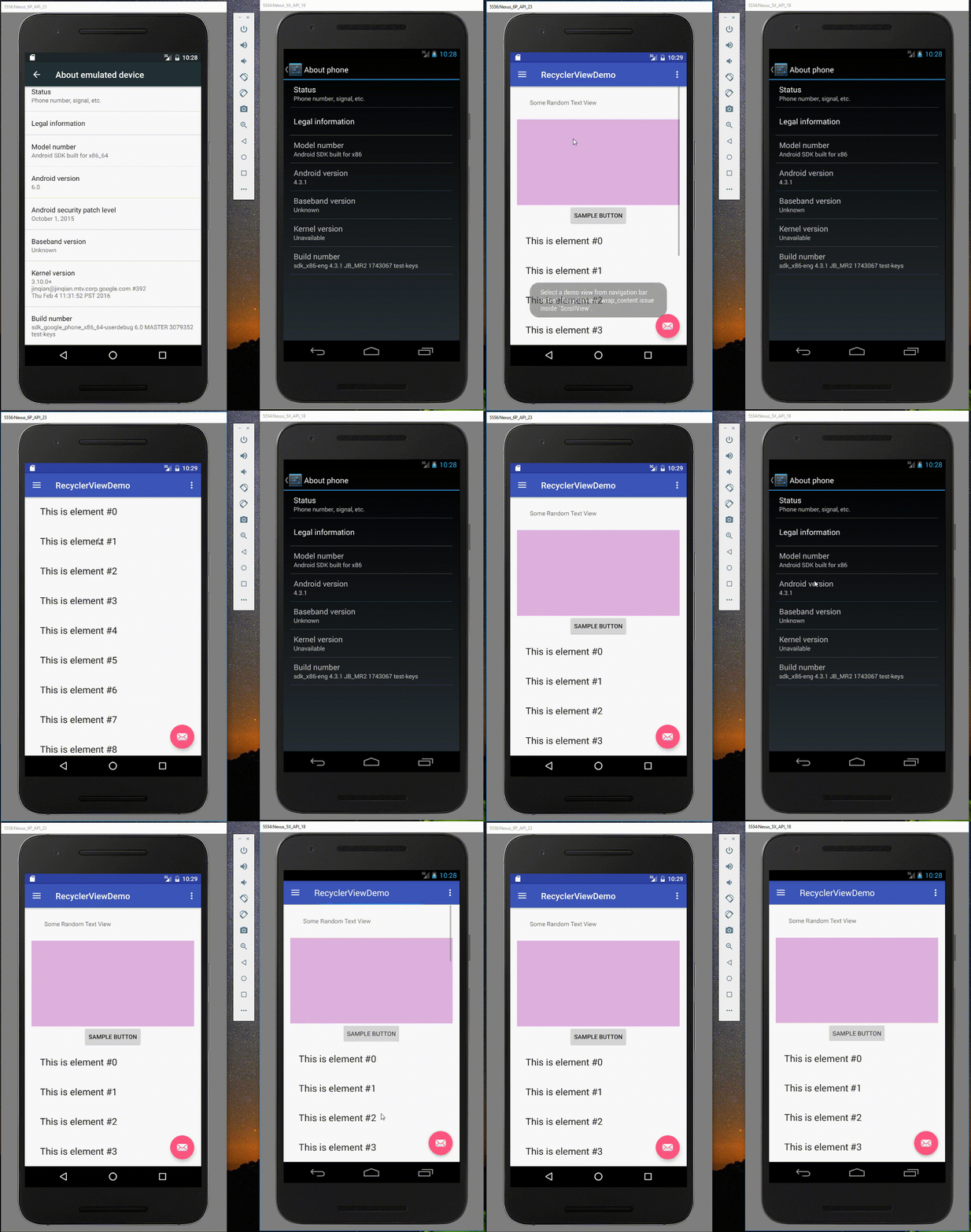
RecyclerViewСRelativeLayout. Не спрашивайте меня, как я нашел это решение!!!¯\_(ツ)_/¯<RelativeLayout android:layout_width="match_parent" android:layout_height="wrap_content" android:descendantFocusability="blocksDescendants"> <android.support.v7.widget.RecyclerView android:layout_width="match_parent" android:layout_height="wrap_content" /> </RelativeLayout>полный пример доступен на GitHub - https://github.com/amardeshbd/android-recycler-view-wrap-content
вот демо скринкаст, показывающий исправление в действии:
несмотря на рекомендацию о том, что
вы никогда не должны помещать прокручиваемый вид внутри другого прокручиваемого вида
это хороший совет, однако если вы установите фиксированную высоту на вид рециркулятора он должен работать нормально.
Если вы знаете высоту макета элемента адаптера, вы можете просто рассчитать высоту RecyclerView.
int viewHeight = adapterItemSize * adapterData.size();
recyclerView.getLayoutParams().height = viewHeight;
в случае, если установка фиксированной высоты для RecyclerView не сработала для кого-то (например, для меня), вот что я добавил к решению с фиксированной высотой:
mRecyclerView.addOnItemTouchListener(new RecyclerView.OnItemTouchListener() {
    @Override
    public boolean onInterceptTouchEvent(RecyclerView rv, MotionEvent e) {
        int action = e.getAction();
        switch (action) {
            case MotionEvent.ACTION_MOVE:
                rv.getParent().requestDisallowInterceptTouchEvent(true);
                break;
        }
        return false;
    }

    @Override
    public void onTouchEvent(RecyclerView rv, MotionEvent e) {

    }

    @Override
    public void onRequestDisallowInterceptTouchEvent(boolean disallowIntercept) {

    }
});
новая Библиотека Поддержки Android 23.2 решает эту проблему, теперь вы можете установить wrap_content в качестве параметров как высота
RecyclerViewи работает правильно.
RecyclerViews прекрасно помещаются в ScrollViews, пока они не прокручиваются сами. В этом случае, имеет смысл сделать его фиксированной высоте.
правильное решение-использовать
wrap_contentна высоте RecyclerView, а затем реализовать пользовательский LinearLayoutManager, который может правильно обрабатывать обертывание.скопируйте этот LinearLayoutManager в свой проект: https://github.com/serso/android-linear-layout-manager/blob/master/lib/src/main/java/org/solovyev/android/views/llm/LinearLayoutManager.java
затем оберните RecyclerView:
<android.support.v7.widget.RecyclerView
    android:layout_width="match_parent"
    android:layout_height="wrap_content"/>
и настроить его так:
    RecyclerView list = (RecyclerView)findViewById(R.id.list);
    list.setHasFixedSize(true);
    list.setLayoutManager(new com.example.myapp.LinearLayoutManager(list.getContext()));
    list.setAdapter(new MyViewAdapter(data));
Edit: это может вызвать осложнения с прокруткой, потому что RecyclerView может украсть события касания ScrollView. Мое решение было просто бросить RecyclerView во всех и пойти с LinearLayout, программно раздуйте подвиды и добавьте их в макет.
на
ScrollView, вы могли бы использоватьfillViewport=trueи сделатьlayout_height="match_parent"как показано ниже, и поместите recycler view внутрь:<ScrollView android:fillViewport="true" android:layout_width="match_parent" android:layout_height="match_parent" android:layout_below="@+id/llOptions"> <android.support.v7.widget.RecyclerView android:id="@+id/rvList" android:layout_width="match_parent" android:layout_height="wrap_content" /> </ScrollView>никакая более дальнеишая регулировка высоты не необходима через код.
расчета
RecyclerView' s высота вручную не хорошо, лучше использовать пользовательскийLayoutManager.причиной вышеуказанной проблемы является любое представление, которое имеет прокрутку (
ListView,GridView,RecyclerView) не удалось вычислить его высоту, когда add как ребенок в другом представлении имеет прокрутку. Так что переопределение егоonMeasureметод решить проблему.пожалуйста, замените менеджер компоновки по умолчанию на следующее:
public class MyLinearLayoutManager extends android.support.v7.widget.LinearLayoutManager {

private static boolean canMakeInsetsDirty = true;
private static Field insetsDirtyField = null;

private static final int CHILD_WIDTH = 0;
private static final int CHILD_HEIGHT = 1;
private static final int DEFAULT_CHILD_SIZE = 100;

private final int[] childDimensions = new int[2];
private final RecyclerView view;

private int childSize = DEFAULT_CHILD_SIZE;
private boolean hasChildSize;
private int overScrollMode = ViewCompat.OVER_SCROLL_ALWAYS;
private final Rect tmpRect = new Rect();

@SuppressWarnings("UnusedDeclaration")
public MyLinearLayoutManager(Context context) {
    super(context);
    this.view = null;
}

@SuppressWarnings("UnusedDeclaration")
public MyLinearLayoutManager(Context context, int orientation, boolean reverseLayout) {
    super(context, orientation, reverseLayout);
    this.view = null;
}

@SuppressWarnings("UnusedDeclaration")
public MyLinearLayoutManager(RecyclerView view) {
    super(view.getContext());
    this.view = view;
    this.overScrollMode = ViewCompat.getOverScrollMode(view);
}

@SuppressWarnings("UnusedDeclaration")
public MyLinearLayoutManager(RecyclerView view, int orientation, boolean reverseLayout) {
    super(view.getContext(), orientation, reverseLayout);
    this.view = view;
    this.overScrollMode = ViewCompat.getOverScrollMode(view);
}

public void setOverScrollMode(int overScrollMode) {
    if (overScrollMode < ViewCompat.OVER_SCROLL_ALWAYS || overScrollMode > ViewCompat.OVER_SCROLL_NEVER)
        throw new IllegalArgumentException("Unknown overscroll mode: " + overScrollMode);
    if (this.view == null) throw new IllegalStateException("view == null");
    this.overScrollMode = overScrollMode;
    ViewCompat.setOverScrollMode(view, overScrollMode);
}

public static int makeUnspecifiedSpec() {
    return View.MeasureSpec.makeMeasureSpec(0, View.MeasureSpec.UNSPECIFIED);
}

@Override
public void onMeasure(RecyclerView.Recycler recycler, RecyclerView.State state, int widthSpec, int heightSpec) {
    final int widthMode = View.MeasureSpec.getMode(widthSpec);
    final int heightMode = View.MeasureSpec.getMode(heightSpec);

    final int widthSize = View.MeasureSpec.getSize(widthSpec);
    final int heightSize = View.MeasureSpec.getSize(heightSpec);

    final boolean hasWidthSize = widthMode != View.MeasureSpec.UNSPECIFIED;
    final boolean hasHeightSize = heightMode != View.MeasureSpec.UNSPECIFIED;

    final boolean exactWidth = widthMode == View.MeasureSpec.EXACTLY;
    final boolean exactHeight = heightMode == View.MeasureSpec.EXACTLY;

    final int unspecified = makeUnspecifiedSpec();

    if (exactWidth && exactHeight) {
        // in case of exact calculations for both dimensions let's use default "onMeasure" implementation
        super.onMeasure(recycler, state, widthSpec, heightSpec);
        return;
    }

    final boolean vertical = getOrientation() == VERTICAL;

    initChildDimensions(widthSize, heightSize, vertical);

    int width = 0;
    int height = 0;

    // it's possible to get scrap views in recycler which are bound to old (invalid) adapter entities. This
    // happens because their invalidation happens after "onMeasure" method. As a workaround let's clear the
    // recycler now (it should not cause any performance issues while scrolling as "onMeasure" is never
    // called whiles scrolling)
    recycler.clear();

    final int stateItemCount = state.getItemCount();
    final int adapterItemCount = getItemCount();
    // adapter always contains actual data while state might contain old data (f.e. data before the animation is
    // done). As we want to measure the view with actual data we must use data from the adapter and not from  the
    // state
    for (int i = 0; i < adapterItemCount; i++) {
        if (vertical) {
            if (!hasChildSize) {
                if (i < stateItemCount) {
                    // we should not exceed state count, otherwise we'll get IndexOutOfBoundsException. For such items
                    // we will use previously calculated dimensions
                    measureChild(recycler, i, widthSize, unspecified, childDimensions);
                } else {
                    logMeasureWarning(i);
                }
            }
            height += childDimensions[CHILD_HEIGHT];
            if (i == 0) {
                width = childDimensions[CHILD_WIDTH];
            }
            if (hasHeightSize && height >= heightSize) {
                break;
            }
        } else {
            if (!hasChildSize) {
                if (i < stateItemCount) {
                    // we should not exceed state count, otherwise we'll get IndexOutOfBoundsException. For such items
                    // we will use previously calculated dimensions
                    measureChild(recycler, i, unspecified, heightSize, childDimensions);
                } else {
                    logMeasureWarning(i);
                }
            }
            width += childDimensions[CHILD_WIDTH];
            if (i == 0) {
                height = childDimensions[CHILD_HEIGHT];
            }
            if (hasWidthSize && width >= widthSize) {
                break;
            }
        }
    }

    if (exactWidth) {
        width = widthSize;
    } else {
        width += getPaddingLeft() + getPaddingRight();
        if (hasWidthSize) {
            width = Math.min(width, widthSize);
        }
    }

    if (exactHeight) {
        height = heightSize;
    } else {
        height += getPaddingTop() + getPaddingBottom();
        if (hasHeightSize) {
            height = Math.min(height, heightSize);
        }
    }

    setMeasuredDimension(width, height);

    if (view != null && overScrollMode == ViewCompat.OVER_SCROLL_IF_CONTENT_SCROLLS) {
        final boolean fit = (vertical && (!hasHeightSize || height < heightSize))
                || (!vertical && (!hasWidthSize || width < widthSize));

        ViewCompat.setOverScrollMode(view, fit ? ViewCompat.OVER_SCROLL_NEVER : ViewCompat.OVER_SCROLL_ALWAYS);
    }
}

private void logMeasureWarning(int child) {
    if (BuildConfig.DEBUG) {
        Log.w("MyLinearLayoutManager", "Can't measure child #" + child + ", previously used dimensions will be reused." +
                "To remove this message either use #setChildSize() method or don't run RecyclerView animations");
    }
}

private void initChildDimensions(int width, int height, boolean vertical) {
    if (childDimensions[CHILD_WIDTH] != 0 || childDimensions[CHILD_HEIGHT] != 0) {
        // already initialized, skipping
        return;
    }
    if (vertical) {
        childDimensions[CHILD_WIDTH] = width;
        childDimensions[CHILD_HEIGHT] = childSize;
    } else {
        childDimensions[CHILD_WIDTH] = childSize;
        childDimensions[CHILD_HEIGHT] = height;
    }
}

@Override
public void setOrientation(int orientation) {
    // might be called before the constructor of this class is called
    //noinspection ConstantConditions
    if (childDimensions != null) {
        if (getOrientation() != orientation) {
            childDimensions[CHILD_WIDTH] = 0;
            childDimensions[CHILD_HEIGHT] = 0;
        }
    }
    super.setOrientation(orientation);
}

public void clearChildSize() {
    hasChildSize = false;
    setChildSize(DEFAULT_CHILD_SIZE);
}

public void setChildSize(int childSize) {
    hasChildSize = true;
    if (this.childSize != childSize) {
        this.childSize = childSize;
        requestLayout();
    }
}

private void measureChild(RecyclerView.Recycler recycler, int position, int widthSize, int heightSize, int[] dimensions) {
    final View child;
    try {
        child = recycler.getViewForPosition(position);
    } catch (IndexOutOfBoundsException e) {
        if (BuildConfig.DEBUG) {
            Log.w("MyLinearLayoutManager", "MyLinearLayoutManager doesn't work well with animations. Consider switching them off", e);
        }
        return;
    }

    final RecyclerView.LayoutParams p = (RecyclerView.LayoutParams) child.getLayoutParams();

    final int hPadding = getPaddingLeft() + getPaddingRight();
    final int vPadding = getPaddingTop() + getPaddingBottom();

    final int hMargin = p.leftMargin + p.rightMargin;
    final int vMargin = p.topMargin + p.bottomMargin;

    // we must make insets dirty in order calculateItemDecorationsForChild to work
    makeInsetsDirty(p);
    // this method should be called before any getXxxDecorationXxx() methods
    calculateItemDecorationsForChild(child, tmpRect);

    final int hDecoration = getRightDecorationWidth(child) + getLeftDecorationWidth(child);
    final int vDecoration = getTopDecorationHeight(child) + getBottomDecorationHeight(child);

    final int childWidthSpec = getChildMeasureSpec(widthSize, hPadding + hMargin + hDecoration, p.width, canScrollHorizontally());
    final int childHeightSpec = getChildMeasureSpec(heightSize, vPadding + vMargin + vDecoration, p.height, canScrollVertically());

    child.measure(childWidthSpec, childHeightSpec);

    dimensions[CHILD_WIDTH] = getDecoratedMeasuredWidth(child) + p.leftMargin + p.rightMargin;
    dimensions[CHILD_HEIGHT] = getDecoratedMeasuredHeight(child) + p.bottomMargin + p.topMargin;

    // as view is recycled let's not keep old measured values
    makeInsetsDirty(p);
    recycler.recycleView(child);
}

private static void makeInsetsDirty(RecyclerView.LayoutParams p) {
    if (!canMakeInsetsDirty) {
        return;
    }
    try {
        if (insetsDirtyField == null) {
            insetsDirtyField = RecyclerView.LayoutParams.class.getDeclaredField("mInsetsDirty");
            insetsDirtyField.setAccessible(true);
        }
        insetsDirtyField.set(p, true);
    } catch (NoSuchFieldException e) {
        onMakeInsertDirtyFailed();
    } catch (IllegalAccessException e) {
        onMakeInsertDirtyFailed();
    }
}

private static void onMakeInsertDirtyFailed() {
    canMakeInsetsDirty = false;
    if (BuildConfig.DEBUG) {
        Log.w("MyLinearLayoutManager", "Can't make LayoutParams insets dirty, decorations measurements might be incorrect");
    }
}
}
попробуйте это. Очень поздний ответ. Но наверняка поможет кому-нибудь в будущем.
установить ваше представление ScrollView, чтобы NestedScrollView
<android.support.v4.widget.NestedScrollView>
 <android.support.v7.widget.RecyclerView>
</android.support.v7.widget.RecyclerView>
</android.support.v4.widget.NestedScrollView>
в Recyclerview
recyclerView.setNestedScrollingEnabled(false);
recyclerView.setHasFixedSize(false);
обновление: этот ответ устарел, так как есть виджеты, такие как NestedScrollView и RecyclerView, которые поддерживают вложенную прокрутку.
вы никогда не должны положить прокрутки внутри другого прокрутки !
Я предлагаю вам сделать свой основной макет recycler view и поместить свои взгляды в качестве элементов recycler view.
взгляните на этот пример он показывает, как использовать несколько видов внутри recycler view adapter. ссылка на пример
вы можете использовать этот способ :
добавьте эту строку в xml-представление recyclerView:
android:nestedScrollingEnabled="false"попробуйте, recyclerview будет плавно прокручиваться с гибкой высотой
надеюсь, что это помогло .
Кажется,
NestedScrollViewне решит проблему. Я тестировал с помощью этого макета:<android.support.v4.widget.NestedScrollView xmlns:android="http://schemas.android.com/apk/res/android" xmlns:app="http://schemas.android.com/apk/res-auto" xmlns:tools="http://schemas.android.com/tools" android:id="@+id/activity_main" android:layout_width="match_parent" android:layout_height="match_parent" > <LinearLayout android:layout_width="match_parent" android:layout_height="wrap_content" android:orientation="vertical" > <TextView android:layout_width="wrap_content" android:layout_height="wrap_content" android:text="@string/dummy_text" /> <android.support.v7.widget.CardView android:layout_width="match_parent" android:layout_height="wrap_content" android:layout_marginLeft="16dp" android:layout_marginRight="16dp" > <android.support.v7.widget.RecyclerView android:id="@+id/recycler_view" android:layout_width="match_parent" android:layout_height="wrap_content"/> </android.support.v7.widget.CardView> </LinearLayout>и все работает без проблем
у меня была та же проблема. Это то, что я пробовал, и это работает. Я делюсь своим кодом xml и java. Надеюсь, это кому-то поможет.
вот xml
<?xml version="1.0" encoding="utf-8"?>
<ScrollView
    android:layout_width="match_parent"
    android:layout_height="wrap_content">
    <LinearLayout
        android:orientation="vertical"
        android:layout_width="match_parent"
        android:layout_height="wrap_content">

        <ImageView
            android:id="@+id/iv_thumbnail"
            android:layout_width="match_parent"
            android:layout_height="200dp" />

        <TextView
            android:id="@+id/tv_description"
            android:layout_width="match_parent"
            android:layout_height="wrap_content"
            android:text="Description" />

        <Button
            android:layout_width="match_parent"
            android:layout_height="wrap_content"
            android:text="Buy" />

        <TextView
            android:layout_width="match_parent"
            android:layout_height="wrap_content"
            android:text="Reviews" />
        <android.support.v7.widget.RecyclerView
            android:id="@+id/rc_reviews"
            android:layout_width="match_parent"
            android:layout_height="wrap_content">

        </android.support.v7.widget.RecyclerView>

    </LinearLayout>
</ScrollView>
вот соответствующий код java. Это работает как шарм.
LinearLayoutManager linearLayoutManager = new LinearLayoutManager(this);
linearLayoutManager.setOrientation(LinearLayoutManager.VERTICAL);
recyclerView.setLayoutManager(linearLayoutManager);
recyclerView.setNestedScrollingEnabled(false);
если поставить
RecyclerViewвнутриNestedScrollViewи включенияrecyclerView.setNestedScrollingEnabled(false);, прокрутка работает хорошо.
Однако, есть проблема
RecyclerViewне рециркулируетнапример,
RecyclerView(внутриNestedScrollViewилиScrollView) есть 100 пункт.
КогдаActivityзапуск, 100 элементов создать (onCreateViewHolderиonBindViewHolderиз 100 пункт будет вызван в то же время).
Например, для каждый элемент, вы будете загружать большое изображение из API = > activity created - > 100 изображение будет загружаться.
Это делает начальную активность медленной и отстающей.
возможное решение:
- Думая об использованииRecyclerViewс несколькими типа.однако, если в вашем случае, есть только несколько элементов в
RecyclerViewи корзина или не рециркулирует не влияет на производительность много, вы можете использоватьRecyclerViewвнутриScrollViewпростые
главная цель
RecyclerViewкомпенсироватьListViewиScrollView. Вместо того, чтобы делать то, что вы на самом деле делаете: имеяRecyclerViewнаScrollView, Я бы предложил иметь толькоRecyclerViewЭто может обрабатывать многие типы детей.
во-первых, вы должны использовать
NestedScrollViewвместоScrollViewи поставитьRecyclerViewвнутриNestedScrollView.используйте пользовательский класс макета для измерения высоты и ширины экрана:
public class CustomLinearLayoutManager extends LinearLayoutManager {

public CustomLinearLayoutManager(Context context, int orientation, boolean reverseLayout) {
    super(context, orientation, reverseLayout);
}

private int[] mMeasuredDimension = new int[2];

@Override
public void onMeasure(RecyclerView.Recycler recycler, RecyclerView.State state,
                      int widthSpec, int heightSpec) {
    final int widthMode = View.MeasureSpec.getMode(widthSpec);
    final int heightMode = View.MeasureSpec.getMode(heightSpec);
    final int widthSize = View.MeasureSpec.getSize(widthSpec);
    final int heightSize = View.MeasureSpec.getSize(heightSpec);
    int width = 0;
    int height = 0;
    for (int i = 0; i < getItemCount(); i++) {
        if (getOrientation() == HORIZONTAL) {
            measureScrapChild(recycler, i,
                    View.MeasureSpec.makeMeasureSpec(i, View.MeasureSpec.UNSPECIFIED),
                    heightSpec,
                    mMeasuredDimension);

            width = width + mMeasuredDimension[0];
            if (i == 0) {
                height = mMeasuredDimension[1];
            }
        } else {
            measureScrapChild(recycler, i,
                    widthSpec,
                    View.MeasureSpec.makeMeasureSpec(i, View.MeasureSpec.UNSPECIFIED),
                    mMeasuredDimension);
            height = height + mMeasuredDimension[1];
            if (i == 0) {
                width = mMeasuredDimension[0];
            }
        }
    }
    switch (widthMode) {
        case View.MeasureSpec.EXACTLY:
            width = widthSize;
        case View.MeasureSpec.AT_MOST:
        case View.MeasureSpec.UNSPECIFIED:
    }

    switch (heightMode) {
        case View.MeasureSpec.EXACTLY:
            height = heightSize;
        case View.MeasureSpec.AT_MOST:
        case View.MeasureSpec.UNSPECIFIED:
    }

    setMeasuredDimension(width, height);
}

private void measureScrapChild(RecyclerView.Recycler recycler, int position, int widthSpec,
                               int heightSpec, int[] measuredDimension) {
    View view = recycler.getViewForPosition(position);
    recycler.bindViewToPosition(view, position);
    if (view != null) {
        RecyclerView.LayoutParams p = (RecyclerView.LayoutParams) view.getLayoutParams();
        int childWidthSpec = ViewGroup.getChildMeasureSpec(widthSpec,
                getPaddingLeft() + getPaddingRight(), p.width);
        int childHeightSpec = ViewGroup.getChildMeasureSpec(heightSpec,
                getPaddingTop() + getPaddingBottom(), p.height);
        view.measure(childWidthSpec, childHeightSpec);
        measuredDimension[0] = view.getMeasuredWidth() + p.leftMargin + p.rightMargin;
        measuredDimension[1] = view.getMeasuredHeight() + p.bottomMargin + p.topMargin;
        recycler.recycleView(view);
    }
}
}
и выполнить ниже код в деятельности/фрагмент
RecyclerView:final CustomLinearLayoutManager layoutManager = new CustomLinearLayoutManager(this, LinearLayoutManager.VERTICAL, false); recyclerView.setLayoutManager(layoutManager); recyclerView.setAdapter(mAdapter); recyclerView.setNestedScrollingEnabled(false); // Disables scrolling for RecyclerView, CustomLinearLayoutManager used instead of MyLinearLayoutManager recyclerView.setHasFixedSize(false); recyclerView.addOnScrollListener(new RecyclerView.OnScrollListener() { @Override public void onScrolled(RecyclerView recyclerView, int dx, int dy) { super.onScrolled(recyclerView, dx, dy); int visibleItemCount = layoutManager.getChildCount(); int totalItemCount = layoutManager.getItemCount(); int lastVisibleItemPos = layoutManager.findLastVisibleItemPosition(); Log.i("getChildCount", String.valueOf(visibleItemCount)); Log.i("getItemCount", String.valueOf(totalItemCount)); Log.i("lastVisibleItemPos", String.valueOf(lastVisibleItemPos)); if ((visibleItemCount + lastVisibleItemPos) >= totalItemCount) { Log.i("LOG", "Last Item Reached!"); } } });
Если RecyclerView показывает только одну строку внутри ScrollView. Вам просто нужно установить высоту строки
android:layout_height="wrap_content".
вы также можете переопределить LinearLayoutManager, чтобы сделать recyclerview рулон плавно
@Override
    public boolean canScrollVertically(){
        return false;
    }
извините за опоздание на вечеринку, но похоже, что есть еще одно решение, которое отлично работает для случая, о котором вы упомянули.
Если вы используете вид recycler внутри вида recycler, он, кажется, работает отлично. Я лично пробовал и использовал его, и это, кажется, не дает никакой медлительности и никакой резкости вообще. Теперь я не уверен, что это хорошая практика или нет , но вложение нескольких представлений recycler, даже вложенный вид прокрутки замедляется. Но это, кажется, работает хорошо. Пожалуйста дайте ему попробовать. Я уверен, что гнездование будет совершенно нормально с этим.
**решение, которое работало для меня
Использовать NestedScrollView с высоты, как wrap_content в качестве параметров<br> RecyclerView android:layout_width="match_parent"<br> android:layout_height="wrap_content"<br> android:nestedScrollingEnabled="false"<br> app:layoutManager="android.support.v7.widget.LinearLayoutManager" tools:targetApi="lollipop"<br><br> and view holder layout <br> android:layout_width="match_parent"<br> android:layout_height="wrap_content"/ / содержимое вашей строки идет сюда
Comments