Xcode UI test-UI Testing Failure-не удалось выполнить прокрутку до видимого (по действию AX) при нажатии на кнопку "Отмена" в поле поиска
Я пытаюсь закрыть поле поиска, нажав кнопку "Отмена" в строке поиска.
тестовый случай не удается найти кнопку "Отмена". Он отлично работал в Xcode 7.0.1
я добавил предикат, чтобы дождаться появления кнопки. Тестовый случай терпит неудачу, когда мы нажимаем кнопку "Отмена"
let button = app.buttons[“Cancel”]

let existsPredicate = NSPredicate(format: "exists == 1")


expectationForPredicate(existsPredicate, evaluatedWithObject: button, handler: nil)

waitForExpectationsWithTimeout(5, handler: nil)


button.tap() // Failing here
журналы:
    t =     7.21s     Tap SearchField

t =     7.21s         Wait for app to idle

t =     7.29s         Find the SearchField

t =     7.29s             Snapshot accessibility hierarchy for com.test.mail

t =     7.49s             Find: Descendants matching type SearchField

t =     7.49s             Find: Element at index 0

t =     7.49s             Wait for app to idle

t =     7.55s         Synthesize event

t =     7.84s         Wait for app to idle

t =     8.97s     Type '[email protected]' into

t =     8.97s         Wait for app to idle

t =     9.03s         Find the "Search" SearchField

t =     9.03s             Snapshot accessibility hierarchy for com.test.mail

t =     9.35s             Find: Descendants matching type SearchField

t =     9.35s             Find: Element at index 0

t =     9.36s             Wait for app to idle

t =     9.42s         Synthesize event

t =    10.37s         Wait for app to idle

t =    10.44s     Check predicate `exists == 1` against object `"Cancel" Button`

t =    10.44s         Snapshot accessibility hierarchy for com.test.mail

t =    10.58s         Find: Descendants matching type Button

t =    10.58s         Find: Elements matching predicate '"Cancel" IN identifiers'

t =    10.58s     Tap "Cancel" Button

t =    10.58s         Wait for app to idle

t =    10.64s         Find the "Cancel" Button

t =    10.64s             Snapshot accessibility hierarchy for com.test.mail

t =    10.78s             Find: Descendants matching type Button

t =    10.78s             Find: Elements matching predicate '"Cancel" IN identifiers'

t =    10.79s             Wait for app to idle

t =    11.08s         Synthesize event

t =    11.13s             Scroll element to visible

t =    11.14s             Assertion Failure: UI Testing Failure - Failed to scroll to visible (by AX action) Button 0x7f7fcaebde40: traits: 8589934593, {{353.0, 26.0}, {53.0, 30.0}}, label: 'Cancel', error: Error -25204 performing AXAction 2003
5 ответов:
Я думаю, здесь кнопка "Отмена" возвращает
falseнаhittableсвойство, которое предотвращает его от нажатия.если вы видите
tap()в документации написано/*! * Sends a tap event to a hittable point computed for the element. */ - (void)tap;кажется, что все сломано с помощью XCode 7.1.To держите себя (и u тоже ;)) разблокирован от этих проблем я написал расширение на
XCUIElementчто позволяет нажать на элемент, даже если он не hittable. Следование может помочь вам./*Sends a tap event to a hittable/unhittable element.*/ extension XCUIElement { func forceTapElement() { if self.hittable { self.tap() } else { let coordinate: XCUICoordinate = self.coordinateWithNormalizedOffset(CGVectorMake(0.0, 0.0)) coordinate.tap() } } }теперь вы можете позвонить как
button.forceTapElement()обновление - для swift 3 используйте следующее:
extension XCUIElement {
    func forceTapElement() {
        if self.isHittable {
            self.tap()
        }
        else {
            let coordinate: XCUICoordinate = self.coordinate(withNormalizedOffset: CGVector(dx:0.0, dy:0.0))
            coordinate.tap()
        }
    }
}
для меня основной причиной было то, что объекты, которые я хотел нажать
- были установлены в скрытый (и обратно)
- были удалены и повторно прикреплены
В обоих случаях
isAccessibilityElementимуществаfalseдалее. Установка его обратно вtrueисправил.
пожалуйста, проверьте признак элемента, я столкнулся с той же проблемой с TableViewSectionHeader, я пытался нажать, но это не удалось в каждой точке
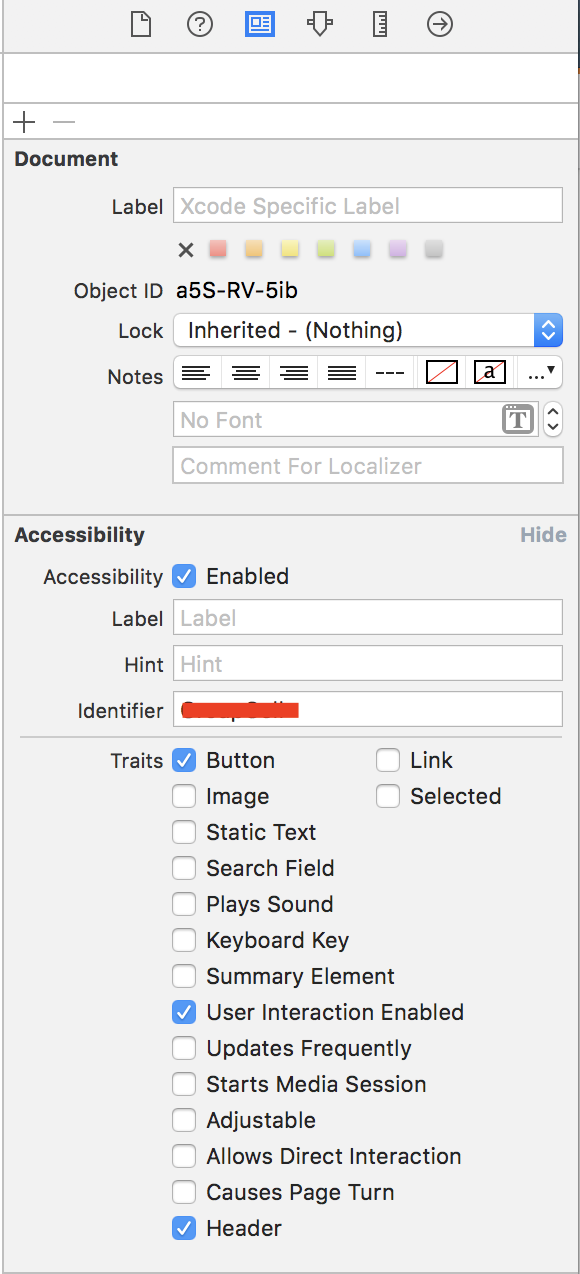
в моем случае это был программно добавленный элемент пользовательского интерфейса, покрывающий кнопку.
Если вы используете симулятор AppCenter для выполнения тестов, вы должны убедиться, что вы выполняете тесты на той же версии устройства, что и ваш локальный симулятор. Из-за этого я потерял 3 дня работы.
Comments